Mass import data by using object ID
You can mass import metric data by object ID, so no mapping change is needed whenever an object’s name changes.
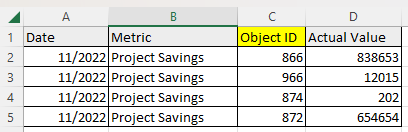
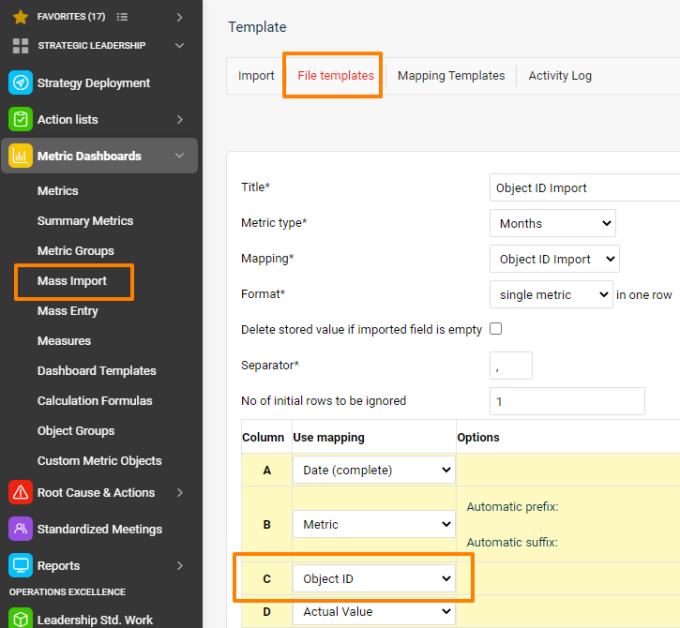
Use object IDs in the import file
Instead of the object name (org. unit, action list, partner, user, action, product, product family, customized object), just use its ID in the CSV file.
Find the object ID
Open the object (via the edit pencil) and scroll all the way down below the form.

An easier option may be to export the org. structure: the export includes the org. units’ IDs.
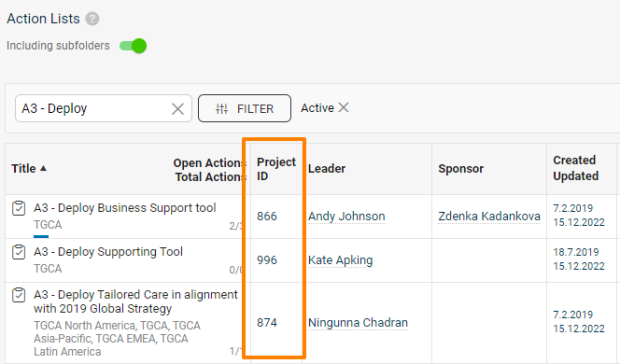
Display action list IDs
The action lists’ IDs can also be displayed as a separate column in the metric dashboards (via the advanced beta setting), or switched on in the list of documents.
Still need help?
Write to us. We usually reply within an hour on business days.