使用对象ID批量导入数据
本文由英文机器翻译。 当前显示英文原文。
You can mass import metric data by object ID, so no mapping change is needed whenever an object’s name changes.
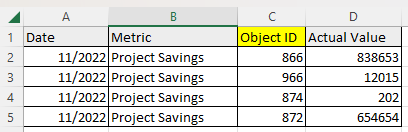
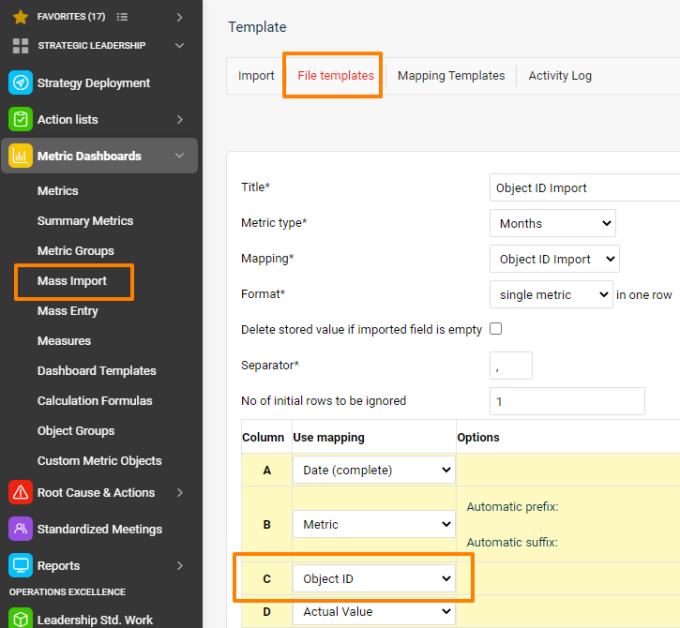
Use object IDs in the import file
Instead of the object name (org. unit, action list, partner, user, action, product, product family, customized object), just use its ID in the CSV file.
Find the object ID
Open the object (via the edit pencil) and scroll all the way down below the form.

An easier option may be to export the org. structure: the export includes the org. units’ IDs.
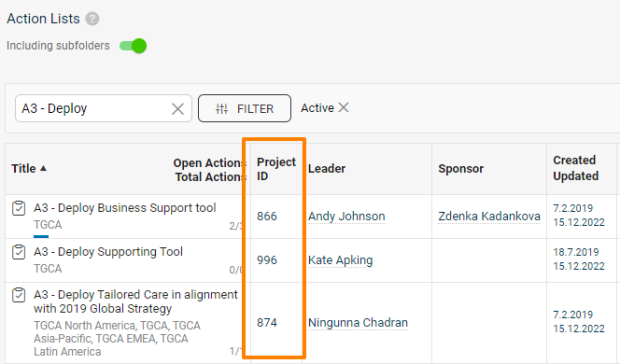
Display action list IDs
The action lists’ IDs can also be displayed as a separate column in the metric dashboards (via the advanced beta setting), or switched on in the list of documents.
您可以按对象ID批量导入指标数据,这样对象名称更改时无需修改映射。
在导入文件中使用对象ID
在CSV文件中直接使用对象的ID,而不是对象名称(组织单元、行动清单、合作伙伴、用户、行动、产品、产品系列、自定义对象)。
查找对象ID
打开对象(通过编辑铅笔图标),滚动到表单最下方。
更简单的方法是导出组织结构:导出文件中包含各组织单元的ID。
显示行动清单ID
行动清单的ID也可以在指标仪表板中显示为单独一列(通过高级Beta设置),或在文档列表中开启显示。
还需要帮助吗?
请给我们留言。工作日我们通常会在一小时内回复。