Action list (Project) statistics
Action list statistics give you an overview of task completion and show how many tasks are open or overdue.
You can use several kinds of statistics:
-
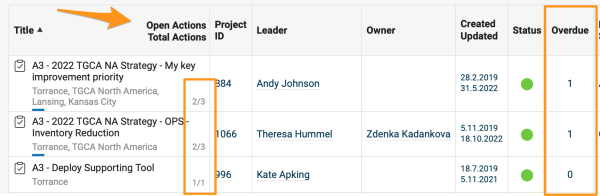
Open and overdue tasks. The list of documents shows the total number of open (not archived) and overdue tasks of each action list document.
-
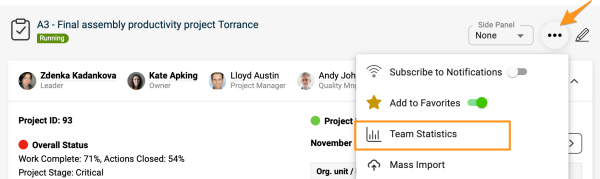
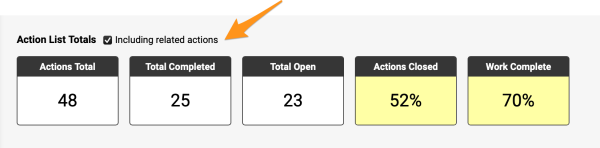
Total and completed tasks. The action list statistics show the total number of tasks (open + archived) of an action list and how many of them are complete (100%). To view the statistics, click the three dots in the upper right corner and select Team Statistics from the submenu.
You can also include related actions in your statistics.
-
On-time completion. These statistics show how many tasks are due in a selected period, how many have been completed, and how many were completed on time. All data are shown as totals for the whole team and for each responsible person.
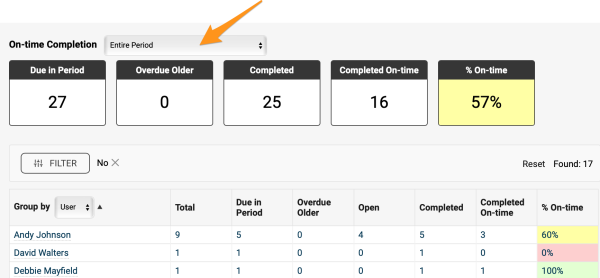
Note: The number of tasks is calculated as the sum of all single tasks. Main tasks that have subtasks are not included.
-
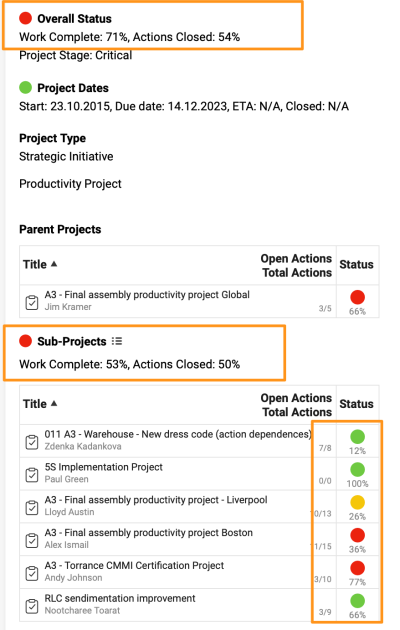
Overall and sub-project status. View the overall status and the completion status of sub-projects at a glance.
Still need help?
Write to us. We usually reply within an hour on business days.