Estadísticas del plan de acción (proyecto)
Traducción automática del inglés. Se muestra el original en inglés.
Action list statistics give you an overview of task completion and show how many tasks are open or overdue.
You can use several kinds of statistics:
-
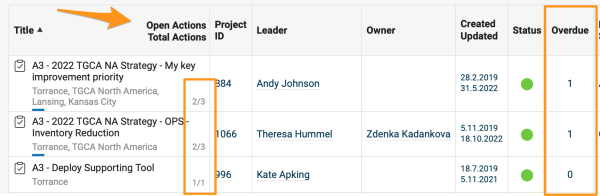
Open and overdue tasks. The list of documents shows the total number of open (not archived) and overdue tasks of each action list document.
-
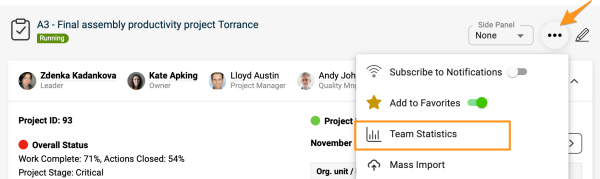
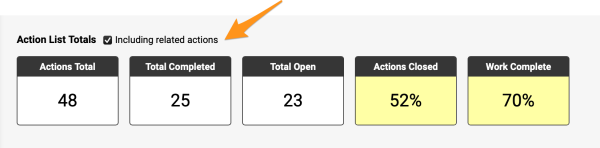
Total and completed tasks. The action list statistics show the total number of tasks (open + archived) of an action list and how many of them are complete (100%). To view the statistics, click the three dots in the upper right corner and select Team Statistics from the submenu.
You can also include related actions in your statistics.
-
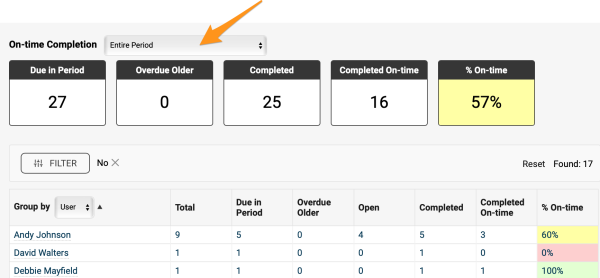
On-time completion. These statistics show how many tasks are due in a selected period, how many have been completed, and how many were completed on time. All data are shown as totals for the whole team and for each responsible person.
Note: The number of tasks is calculated as the sum of all single tasks. Main tasks that have subtasks are not included.
-
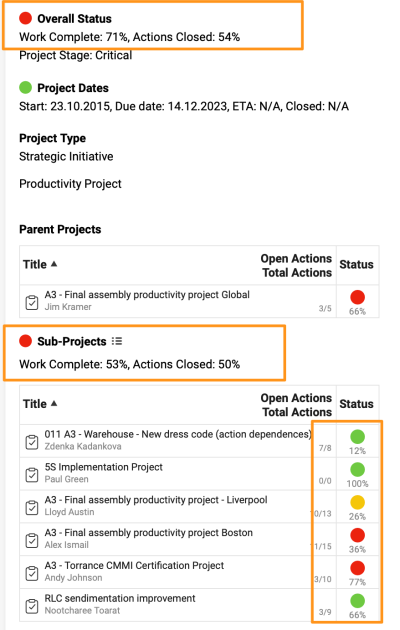
Overall and sub-project status. View the overall status and the completion status of sub-projects at a glance.
Las estadísticas del plan de acción le dan una visión general del cumplimiento de las tareas y muestran cuántas están abiertas o vencidas.
Puede usar varios tipos de estadísticas:
-
Tareas abiertas y vencidas. La lista de documentos muestra el número total de tareas abiertas (no archivadas) y vencidas de cada plan de acción.
-
Tareas totales y completadas. Las estadísticas del plan de acción muestran el número total de tareas (abiertas + archivadas) y cuántas están completadas (100 %). Para verlas, haga clic en los tres puntos de la esquina superior derecha y elija Estadísticas del equipo en el submenú.
También puede incluir las acciones relacionadas en las estadísticas.
-
Cumplimiento a tiempo. Estas estadísticas muestran cuántas tareas vencen en el periodo elegido, cuántas se completaron y cuántas se completaron a tiempo. Todos los datos se muestran como totales del equipo y de cada responsable.
Nota: el número de tareas se calcula como la suma de todas las tareas individuales. No se cuentan las tareas principales que tienen subtareas.
-
Estado general y de los subproyectos. Vea de un vistazo el estado general y el avance de los subproyectos.
¿Necesita más ayuda?
Escríbanos. En días laborables solemos responder en menos de una hora.