行动清单(项目)统计
本文由英文机器翻译。 当前显示英文原文。
Action list statistics give you an overview of task completion and show how many tasks are open or overdue.
You can use several kinds of statistics:
-
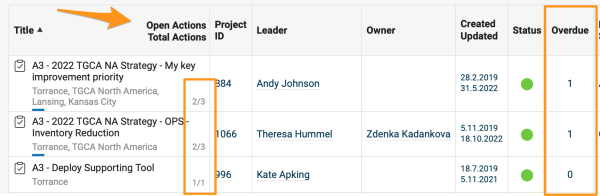
Open and overdue tasks. The list of documents shows the total number of open (not archived) and overdue tasks of each action list document.
-
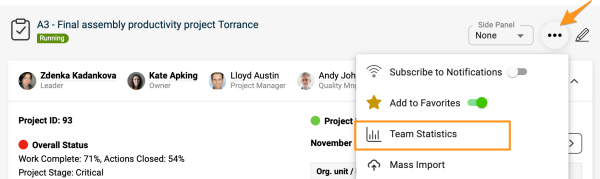
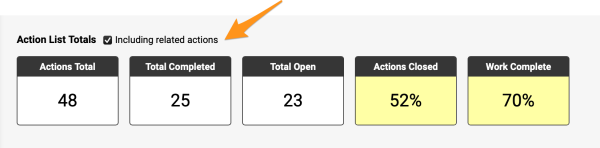
Total and completed tasks. The action list statistics show the total number of tasks (open + archived) of an action list and how many of them are complete (100%). To view the statistics, click the three dots in the upper right corner and select Team Statistics from the submenu.
You can also include related actions in your statistics.
-
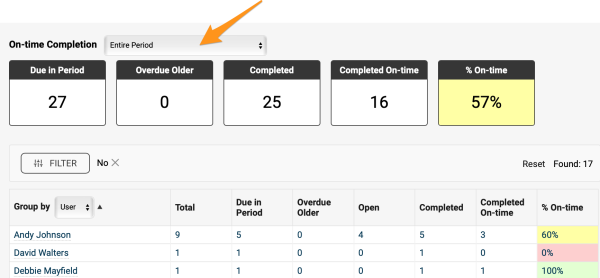
On-time completion. These statistics show how many tasks are due in a selected period, how many have been completed, and how many were completed on time. All data are shown as totals for the whole team and for each responsible person.
Note: The number of tasks is calculated as the sum of all single tasks. Main tasks that have subtasks are not included.
-
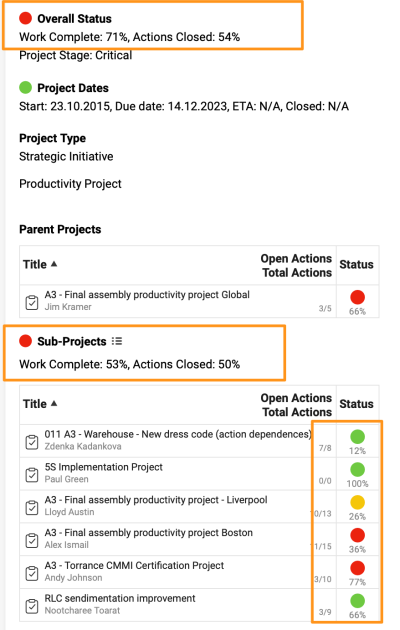
Overall and sub-project status. View the overall status and the completion status of sub-projects at a glance.
行动清单统计可让您全面了解任务完成情况,并显示未完成和逾期的任务数量。
您可以使用以下几种统计:
-
未完成和逾期任务。 文档列表会显示每个行动清单文档中未完成(未归档)和逾期任务的总数。
-
任务总数和已完成任务。 行动清单统计会显示该行动清单的任务总数(未完成 + 已归档)以及其中已完成(100%)的数量。要查看统计,请点击右上角的三个点,在子菜单中选择 团队统计。
您还可以将关联行动纳入统计。
-
按时完成情况。 此统计显示在所选期间内到期的任务数、已完成的任务数以及按时完成的任务数。所有数据均按整个团队和每位负责人分别汇总显示。
注意:任务数按所有单项任务的总和计算,不包括含有子任务的主任务。
-
总体和子项目状态。 一目了然地查看总体状态和各子项目的完成状态。
还需要帮助吗?
请给我们留言。工作日我们通常会在一小时内回复。