How to set up a Parent project and Subprojects
Did you know that you can link projects together in a cascading hierarchy? At a glance, you can review your supporting projects with their up-to-date status and completion rate. You can also open any of these projects with one click for immediate information, a detailed drill-down, or to review and execute actions.
See the project hierarchy
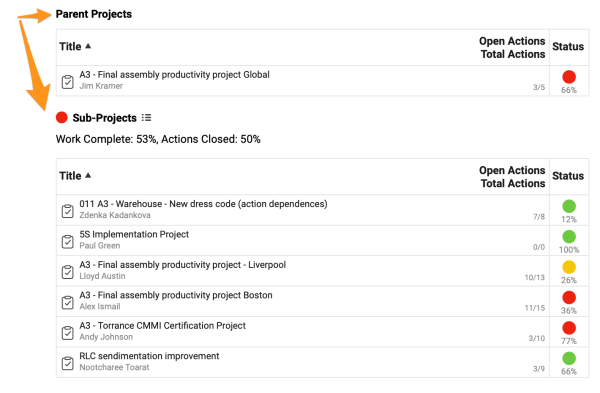
Set up parent projects and subprojects
-
Open the action list settings. Click the edit pencil in the upper right corner.

-
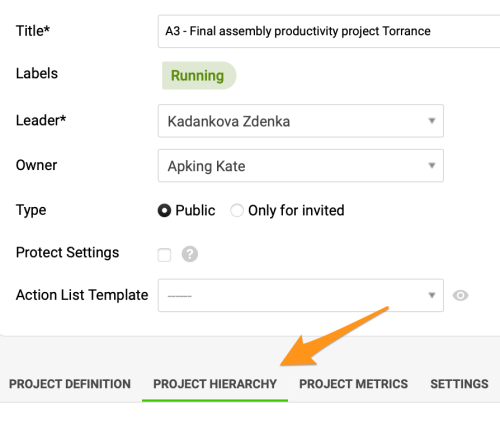
Add parent projects or subprojects. Click the Project Hierarchy tab and add your parent projects and/or subprojects with the Add buttons. You can choose from the other existing projects in the system in the submenu.
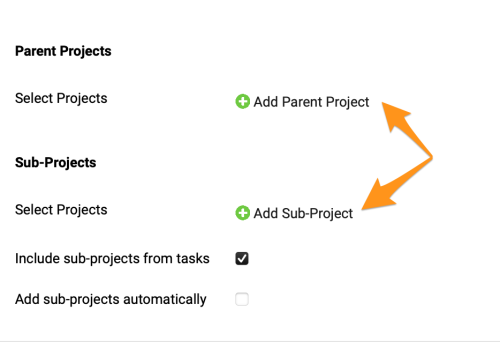
Please note that you can add parent projects and subprojects as you need:
- Subprojects only. You can connect your main (parent) project with supporting subprojects only.
- Parent project only. You can connect your subproject with a parent project only.
- Both. You can connect your project with a parent project and also with other supporting subprojects.
Still need help?
Write to us. We usually reply within an hour on business days.