如何设置父项目和子项目
本文由英文机器翻译。 当前显示英文原文。
Did you know that you can link projects together in a cascading hierarchy? At a glance, you can review your supporting projects with their up-to-date status and completion rate. You can also open any of these projects with one click for immediate information, a detailed drill-down, or to review and execute actions.
See the project hierarchy
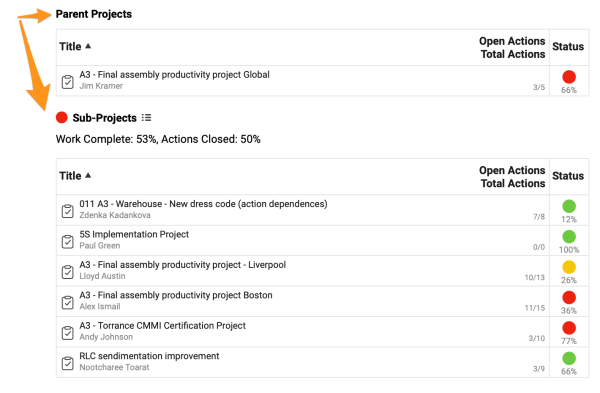
Set up parent projects and subprojects
-
Open the action list settings. Click the edit pencil in the upper right corner.

-
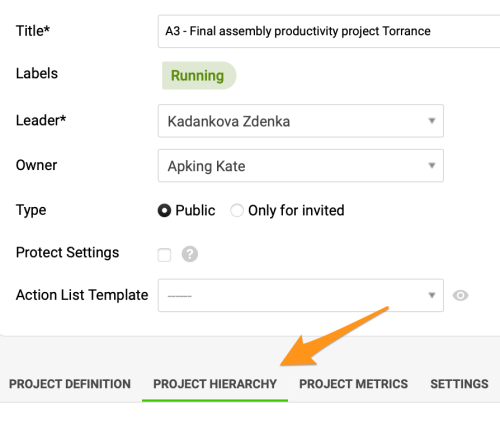
Add parent projects or subprojects. Click the Project Hierarchy tab and add your parent projects and/or subprojects with the Add buttons. You can choose from the other existing projects in the system in the submenu.
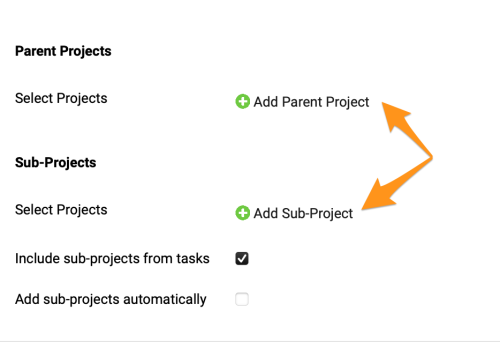
Please note that you can add parent projects and subprojects as you need:
- Subprojects only. You can connect your main (parent) project with supporting subprojects only.
- Parent project only. You can connect your subproject with a parent project only.
- Both. You can connect your project with a parent project and also with other supporting subprojects.
您知道吗?项目之间可以按层级逐级关联。您可以一目了然地查看各支持项目的最新状态和完成率,还可以一键打开其中任意项目,立即获取信息、深入查看详情,或检查和执行行动。
查看项目层级
设置父项目和子项目
-
打开行动清单设置。 点击右上角的编辑铅笔。
-
添加父项目或子项目。 点击 项目层级 选项卡,使用 添加 按钮添加父项目和/或子项目。可以在子菜单中从系统中其他现有项目里选择。
请注意,您可以根据需要添加父项目和子项目:
- 仅子项目。 可以只将主(父)项目与支持子项目关联。
- 仅父项目。 可以只将子项目与父项目关联。
- 两者兼有。 可以将项目既与父项目关联,又与其他支持子项目关联。
另请参阅如何根据项目类型将子项目自动添加到主行动清单。
还需要帮助吗?
请给我们留言。工作日我们通常会在一小时内回复。