¿Cómo accedo a la ficha de capacitación del empleado?
Traducción automática del inglés. Se muestra el original en inglés.
-
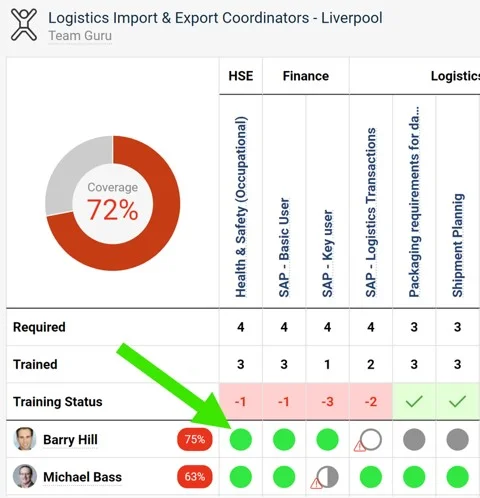
Open the skill matrix. Go to the skill matrix. In this example, we are viewing Logistics Import & Export Coordinators - Liverpool.
-
Click the matrix field. Click the matrix field of the employee’s record you want to view. Here we want to see Barry Hill’s Health & Safety qualifications:
-
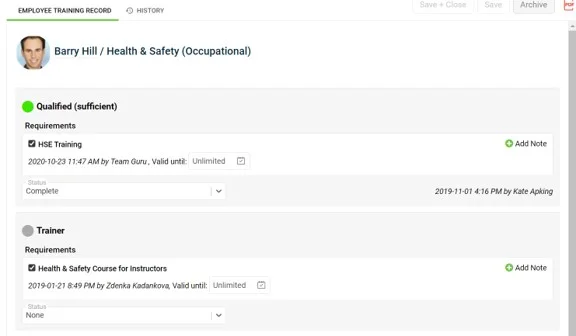
Review and update the record. You now see the employee’s training record for the skill. You can also update the Status and the validity or expiration, and add notes.
-
Abra la matriz de habilidades. Vaya a la matriz de habilidades. En este ejemplo vemos Logistics Import & Export Coordinators - Liverpool.
-
Haga clic en la celda de la matriz. Haga clic en la celda del empleado cuyo registro quiere ver. Aquí queremos ver las calificaciones de seguridad y salud de Barry Hill:
-
Revise y actualice el registro. Ahora ve el registro de capacitación del empleado para esa habilidad. También puede actualizar el Estado y la vigencia o el vencimiento, y agregar notas.
¿Necesita más ayuda?
Escríbanos. En días laborables solemos responder en menos de una hora.