在哪里设置新用户组?
本文由英文机器翻译。 当前显示英文原文。
User groups can be set up by TeamGuru administrators who have the right to edit users. Create a user group as follows:
-
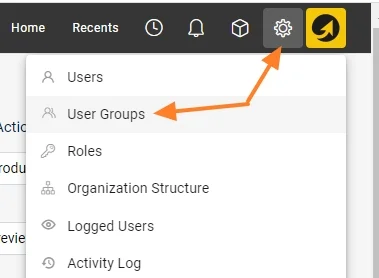
Open the Settings menu. Go to the Settings main menu.
-
Open the user groups. Click the User Groups submenu.
-
Create a new group. Click the green Create New button.

-
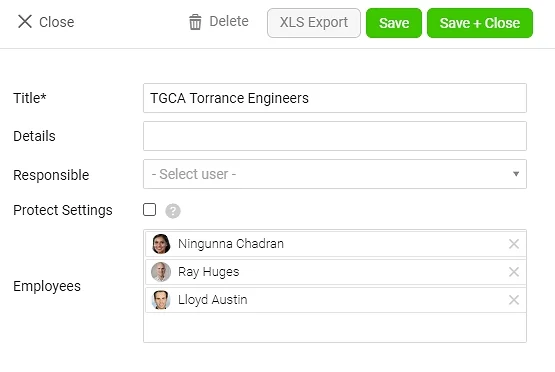
Define and save the group. Specify the new user group and save it.
具有用户编辑权限的TeamGuru管理员可以设置用户组。按以下步骤创建用户组:
-
打开设置菜单。 进入 设置 主菜单。
-
打开用户组。 点击 用户组 子菜单。
-
新建用户组。 点击绿色的 新建 按钮。
-
定义并保存用户组。 设置新用户组并保存。
还需要帮助吗?
请给我们留言。工作日我们通常会在一小时内回复。