谁可以审批清单项?
本文由英文机器翻译。 当前显示英文原文。
Only a predefined approver can approve the individual checklist items.
-
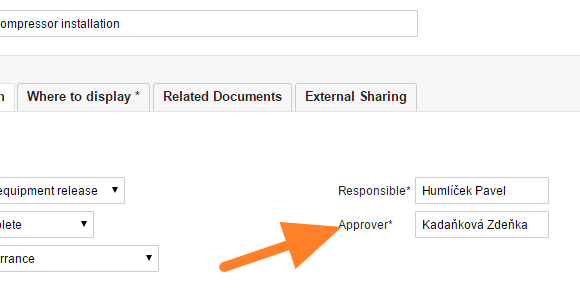
Set the approver of the checklist. To set up an approver for the whole checklist, open the checklist edit screen with the Edit icon

and select the required person.
-
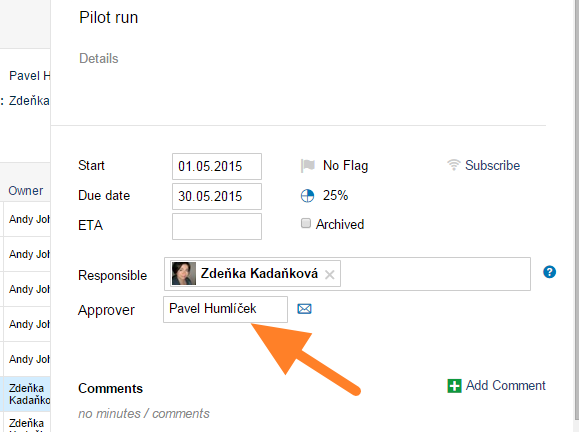
Change the approver of an item. To change the approver for some checklist items only, do it in the action detail screen: click the action and set up an approver.
-
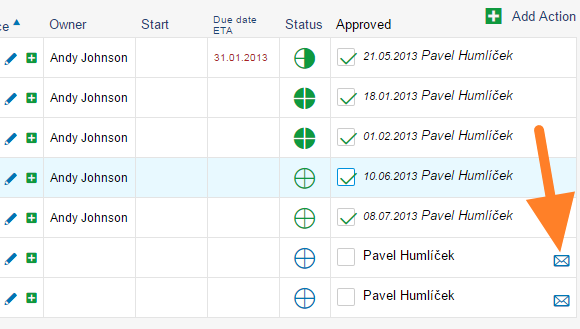
Ask for an approval. To ask for an approval, go to the checklist and click the envelope icon. An approval request is automatically sent to the particular person. Approved tasks are marked with a green tick.
只有预先指定的审批人才能审批各个清单项。
-
设置清单的审批人。 要为整个清单设置审批人,请通过 编辑 图标打开清单编辑界面
然后选择相应人员。
-
更改某一项的审批人。 如果只想更改部分清单项的审批人,请在行动详情界面中操作:点击该行动并设置审批人。
-
申请审批。 要申请审批,请打开清单并点击信封图标。系统会自动向相应人员发送审批请求。已审批的任务会标有绿色对勾。
还需要帮助吗?
请给我们留言。工作日我们通常会在一小时内回复。