在哪里查看文档的历史版本?
本文由英文机器翻译。 当前显示英文原文。
When you click a document, it always opens in its latest version. To view the previous versions:
-
Open the document.
-
Go to the version history. Open the Version history tab.
-
View a previous version. Click the View icon of the previous version you need.
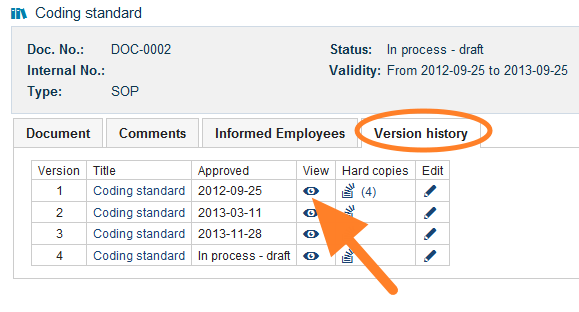
点击文档时,打开的始终是最新版本。要查看历史版本:
-
打开文档。
-
进入版本历史。 打开 版本历史 选项卡。
-
查看历史版本。 点击所需历史版本的 查看 图标。
还需要帮助吗?
请给我们留言。工作日我们通常会在一小时内回复。