如何查看子文件夹中的所有文档
本文由英文机器翻译。 当前显示英文原文。
To view all documents within a folder and its subfolders:
-
Open the module. Click the relevant module button.
-
Select the main folder. Click the name of the main organization folder.
-
Include the subfolders. Tick the Include Subfolders checkbox.
-
See all documents. You see all documents saved in the main folder and in its subfolders.
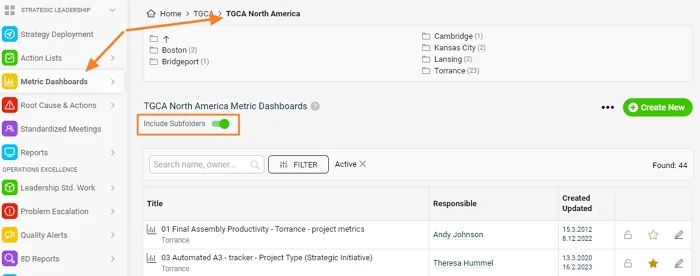
查看某个文件夹及其子文件夹中的所有文档:
-
打开模块。 点击相应的模块按钮。
-
选择主文件夹。 点击主组织文件夹的名称。
-
包含子文件夹。 勾选 包含子文件夹 复选框。
-
查看所有文档。 此时会显示保存在主文件夹及其子文件夹中的所有文档。
还需要帮助吗?
请给我们留言。工作日我们通常会在一小时内回复。