左侧面板:模块菜单
本文由英文机器翻译。 当前显示英文原文。
The collapsible left menu lets you take advantage of extra space for displaying your TeamGuru reports.
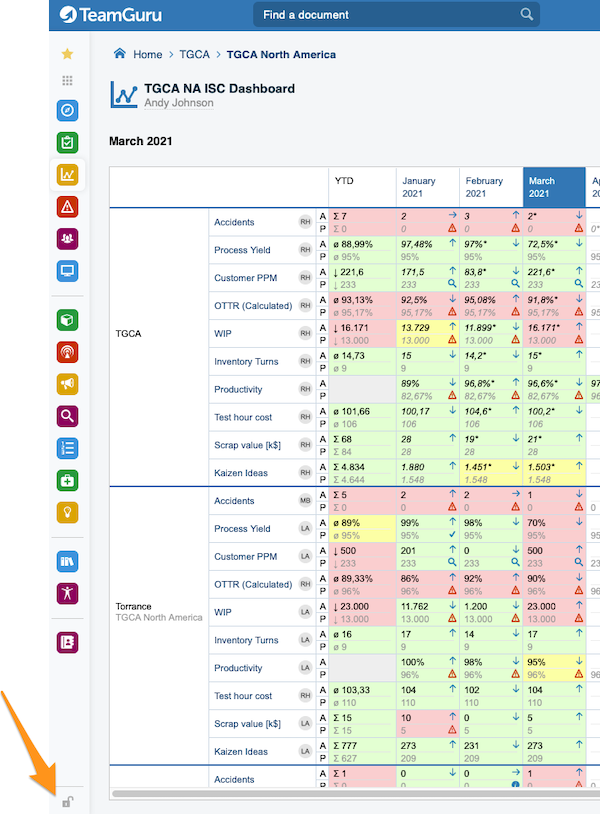
Lock or unlock the menu
To lock or unlock your modules menu, click the icon in the bottom left corner.
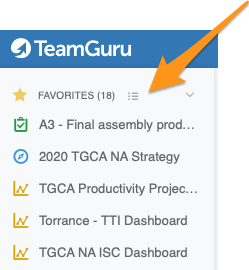
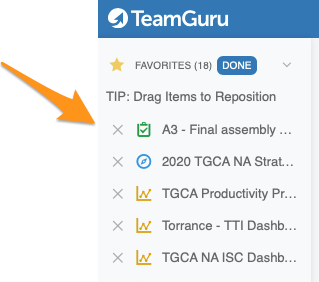
Edit your Favorites
Click the edit button right next to Favorites. You can then sort your favorites (drag and drop) or remove them as you like.
You don’t need to adjust your menu settings every time. When you lock or unlock your menu, or show more or fewer favorites, the system remembers your last settings until the next time you log in.
左侧菜单可以折叠,为TeamGuru报告的显示腾出更多空间。
锁定或解锁菜单
要锁定或解锁模块菜单,请点击左下角的图标。
编辑收藏夹
点击收藏夹旁边的编辑按钮。然后,您可以随意排序(拖放)或移除收藏项。
您无需每次都调整菜单设置。锁定或解锁菜单,或者显示更多或更少的收藏项后,系统会记住您最近的设置,直到您下次登录。
还需要帮助吗?
请给我们留言。工作日我们通常会在一小时内回复。