So legen Sie einen neuen Dokumenttyp an
Maschinelle Übersetzung aus dem Englischen. Englisches Original wird angezeigt.
Your documents can be of different types, e.g. SOPs, instructions, manuals, etc. Create a new type as follows.
Open the document types
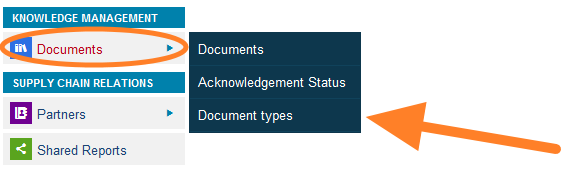
Go to the Documents menu and select the Document types submenu.
Add a new type
Click the Add icon and create a new document type.
Ihre Dokumente können unterschiedliche Typen haben, z. B. SOPs, Anweisungen, Handbücher usw. So legen Sie einen neuen Typ an.
Dokumenttypen öffnen
Öffnen Sie das Menü Dokumente und wählen Sie das Untermenü Dokumenttypen.
Neuen Typ hinzufügen
Klicken Sie auf das Symbol Hinzufügen und legen Sie einen neuen Dokumenttyp an.
Brauchen Sie weitere Hilfe?
Schreiben Sie uns. An Werktagen antworten wir meist innerhalb einer Stunde.