如何创建新的文档类型
本文由英文机器翻译。 当前显示英文原文。
Your documents can be of different types, e.g. SOPs, instructions, manuals, etc. Create a new type as follows.
Open the document types
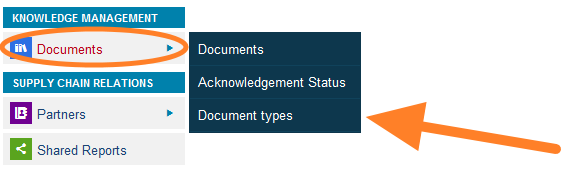
Go to the Documents menu and select the Document types submenu.
Add a new type
Click the Add icon and create a new document type.
文档可以有不同的类型,例如SOP、作业指导、手册等。按以下步骤创建新类型。
打开文档类型
进入 文档 菜单,选择 文档类型 子菜单。
添加新类型
点击 添加 图标,创建新的文档类型。
还需要帮助吗?
请给我们留言。工作日我们通常会在一小时内回复。