So ändern Sie das Zeitformat (12 oder 24 Stunden)
Maschinelle Übersetzung aus dem Englischen. Englisches Original wird angezeigt.
You can change the time format in your profile.
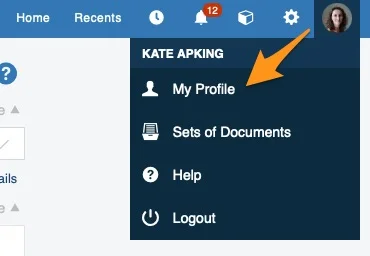
Open your profile
Click your profile in the upper right corner and choose My Profile from the submenu.
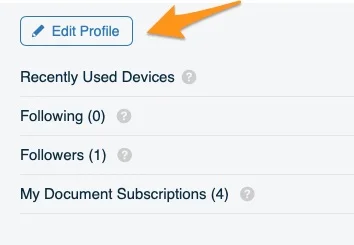
Edit your profile
Click the Edit Profile button.
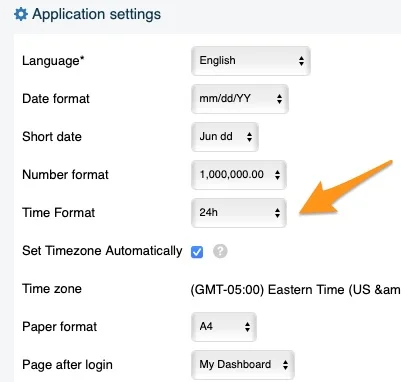
Choose the time format
Change the time format to your preference.
Note for system administrators: TG support administrators can set the time format for the whole instance according to your preference. However, the change affects only new users: existing users have to adjust the time format in their own profile.
Sie können das Zeitformat in Ihrem Profil ändern.
Profil öffnen
Klicken Sie oben rechts auf Ihr Profil und wählen Sie im Untermenü Mein Profil.
Profil bearbeiten
Klicken Sie auf die Schaltfläche Profil bearbeiten.
Zeitformat wählen
Stellen Sie das gewünschte Zeitformat ein.
Hinweis für Systemadministratoren: Die Administratoren des TG-Supports können das Zeitformat für die gesamte Instanz nach Ihren Wünschen festlegen. Die Änderung gilt jedoch nur für neue Benutzer: Bestehende Benutzer müssen das Zeitformat in ihrem eigenen Profil anpassen.
Brauchen Sie weitere Hilfe?
Schreiben Sie uns. An Werktagen antworten wir meist innerhalb einer Stunde.