How to view Actions or Comments Next to Dashboard
You can view actions and comments right next to your dashboard. You can also view comments in a row next to your projects, org. units or partners per time period.
Watch the video guide, or follow the text instructions below.
View actions or comments for a time period
-
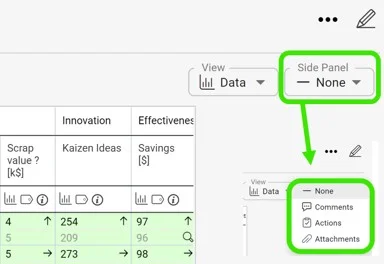
Set the date range and open the drop-down menu. First, set your dashboard to the date range you want to view comments for. Then open the drop-down menu where you can select Actions or Comments. Choose comments to see all the commentary for the selected time period.
-
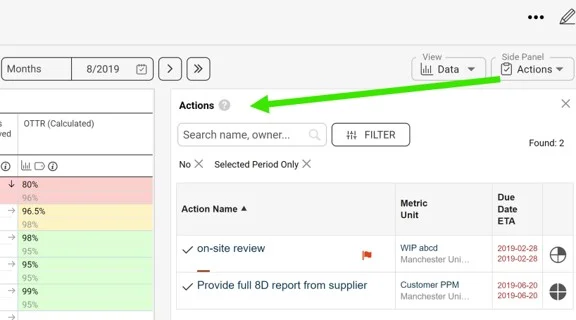
View the actions. Select Actions from the drop-down menu to see which actions are required for the set time period.
-
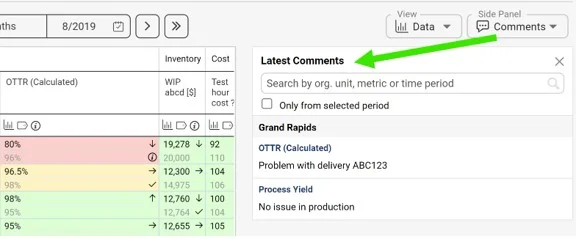
View the comments. Similarly, select Comments from the drop-down menu to see the applicable commentary for the set time period.
-
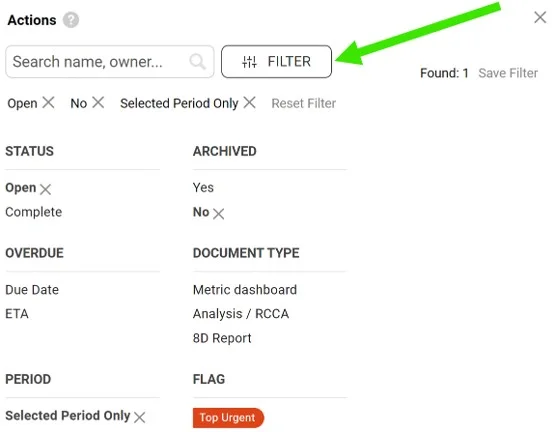
Filter the comments. You can also filter the comments using the available filters.
Still need help?
Write to us. We usually reply within an hour on business days.