如何在仪表板旁查看行动或评论
本文由英文机器翻译。 当前显示英文原文。
You can view actions and comments right next to your dashboard. You can also view comments in a row next to your projects, org. units or partners per time period.
Watch the video guide, or follow the text instructions below.
View actions or comments for a time period
-
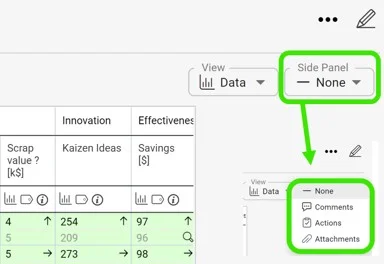
Set the date range and open the drop-down menu. First, set your dashboard to the date range you want to view comments for. Then open the drop-down menu where you can select Actions or Comments. Choose comments to see all the commentary for the selected time period.
-
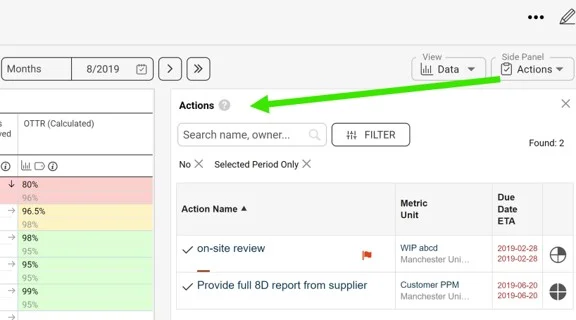
View the actions. Select Actions from the drop-down menu to see which actions are required for the set time period.
-
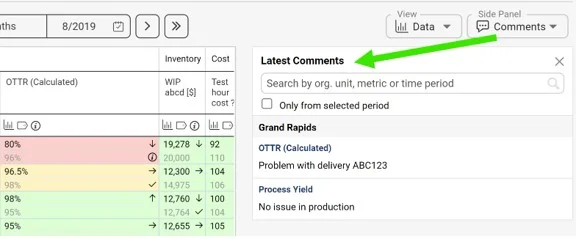
View the comments. Similarly, select Comments from the drop-down menu to see the applicable commentary for the set time period.
-
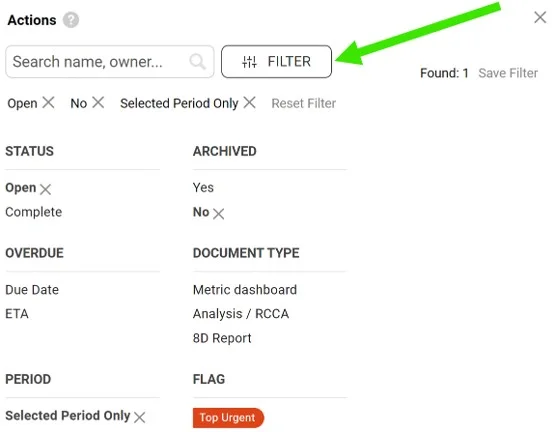
Filter the comments. You can also filter the comments using the available filters.
您可以直接在仪表板旁查看行动和评论。您还可以按时间段在行中查看评论,评论显示在项目、组织单元或合作伙伴旁边。
您可以观看视频指南,也可以按照下面的文字说明操作。
查看某个时间段的行动或评论
-
设置日期范围并打开下拉菜单。 首先,将仪表板设置为要查看评论的日期范围。然后打开下拉菜单,从中选择行动或评论。选择评论即可查看所选时间段的全部评论。
-
查看行动。 在下拉菜单中选择行动,查看所设时间段需要执行哪些行动。
-
查看评论。 同样,在下拉菜单中选择评论,查看所设时间段的相关评论。
-
筛选评论。 您还可以使用可用的筛选条件筛选评论。
还需要帮助吗?
请给我们留言。工作日我们通常会在一小时内回复。