Jak wyświetlić działania lub komentarze obok dashboardu
Tłumaczenie maszynowe z angielskiego. Wyświetlany jest oryginał po angielsku.
You can view actions and comments right next to your dashboard. You can also view comments in a row next to your projects, org. units or partners per time period.
Watch the video guide, or follow the text instructions below.
View actions or comments for a time period
-
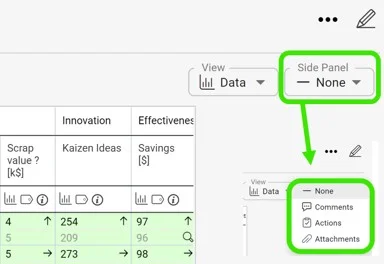
Set the date range and open the drop-down menu. First, set your dashboard to the date range you want to view comments for. Then open the drop-down menu where you can select Actions or Comments. Choose comments to see all the commentary for the selected time period.
-
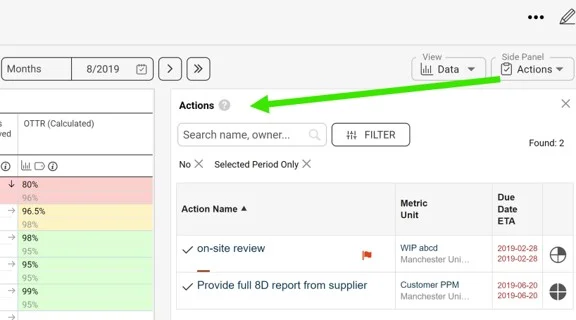
View the actions. Select Actions from the drop-down menu to see which actions are required for the set time period.
-
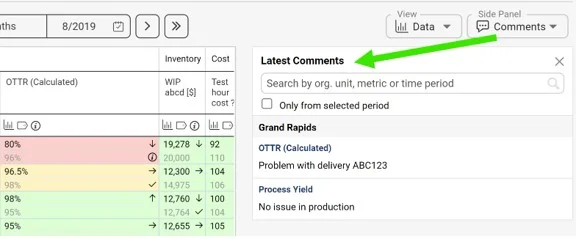
View the comments. Similarly, select Comments from the drop-down menu to see the applicable commentary for the set time period.
-
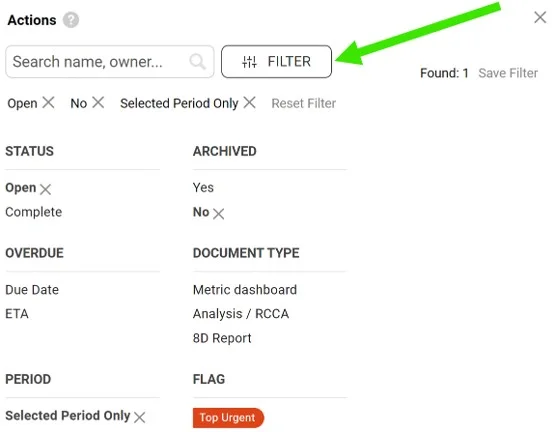
Filter the comments. You can also filter the comments using the available filters.
Działania i komentarze możesz wyświetlić bezpośrednio obok dashboardu. Możesz też wyświetlić komentarze w wierszu obok projektów, jednostek organizacyjnych lub partnerów dla każdego okresu.
Obejrzyj instrukcję wideo albo wykonaj poniższe kroki.
Wyświetl działania lub komentarze dla okresu
-
Ustaw zakres dat i otwórz menu rozwijane. Najpierw ustaw na dashboardzie zakres dat, dla którego chcesz zobaczyć komentarze. Potem otwórz menu rozwijane, w którym wybierzesz Działania lub Komentarze. Wybierz komentarze, aby zobaczyć wszystkie uwagi z wybranego okresu.
-
Wyświetl działania. Wybierz z menu rozwijanego Działania, aby zobaczyć, jakie działania są wymagane w ustawionym okresie.
-
Wyświetl komentarze. W ten sam sposób wybierz z menu rozwijanego Komentarze, aby zobaczyć uwagi dotyczące ustawionego okresu.
-
Przefiltruj komentarze. Komentarze możesz też przefiltrować dostępnymi filtrami.
Potrzebujesz dalszej pomocy?
Napisz do nas. W dni robocze zwykle odpowiadamy w ciągu godziny.