Masowy import statusu szkoleń
Tłumaczenie maszynowe z angielskiego. Wyświetlany jest oryginał po angielsku.
Update your users’ skills more efficiently with a mass upload. You can update the skill, the level achieved, the status or the expiration date.
-
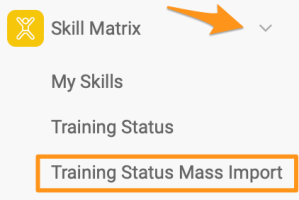
Open the mass import. In the Skill Matrix module submenu, select Training Status Mass Import.
Please note that sufficient rights are required to use this feature.
-
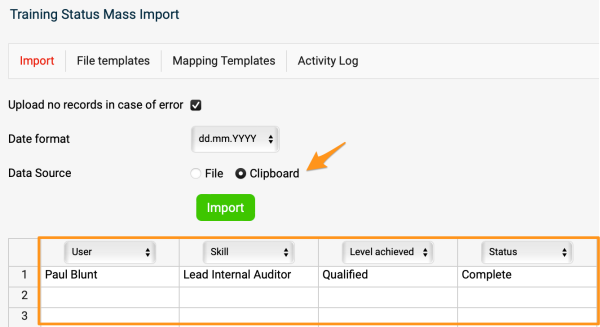
Define the column headers. Select Clipboard and define the column headers (e.g. User, Skill, etc.).
-
Enter the employee data. Enter the employee information into the rows (you can copy and paste it if needed).
-
Import the data. Click the Import button.
-
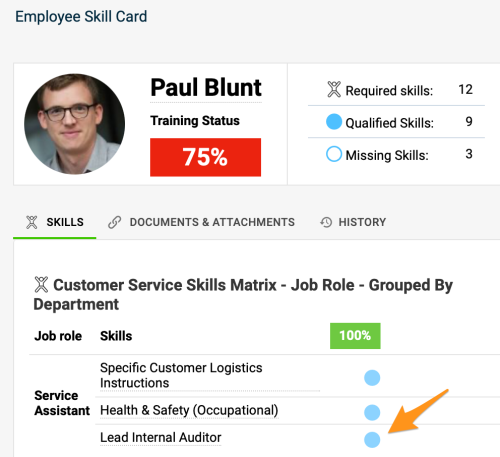
Check the updated skills. The skill is updated in your skill matrices and also in the employees’ skill cards.
Aktualizuj kompetencje użytkowników szybciej dzięki masowemu importowi. Możesz zaktualizować kompetencję, osiągnięty poziom, status lub datę ważności.
-
Otwórz import masowy. W podmenu modułu Matryca kompetencji wybierz Masowy import statusu szkoleń.
Do tej funkcji potrzebujesz odpowiednich uprawnień.
-
Określ nagłówki kolumn. Wybierz Schowek i określ nagłówki kolumn (np. Użytkownik, Kompetencja).
-
Wpisz dane pracowników. Wpisz dane pracowników w wierszach (w razie potrzeby możesz je skopiować i wkleić).
-
Zaimportuj dane. Kliknij przycisk Importuj.
-
Sprawdź zaktualizowane kompetencje. Kompetencja zostanie zaktualizowana w matrycach kompetencji i na kartach kompetencji pracowników.
Potrzebujesz dalszej pomocy?
Napisz do nas. W dni robocze zwykle odpowiadamy w ciągu godziny.