培训状态批量导入
本文由英文机器翻译。 当前显示英文原文。
Update your users’ skills more efficiently with a mass upload. You can update the skill, the level achieved, the status or the expiration date.
-
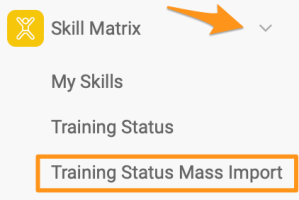
Open the mass import. In the Skill Matrix module submenu, select Training Status Mass Import.
Please note that sufficient rights are required to use this feature.
-
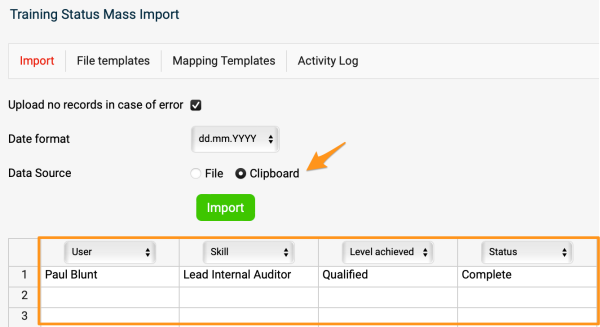
Define the column headers. Select Clipboard and define the column headers (e.g. User, Skill, etc.).
-
Enter the employee data. Enter the employee information into the rows (you can copy and paste it if needed).
-
Import the data. Click the Import button.
-
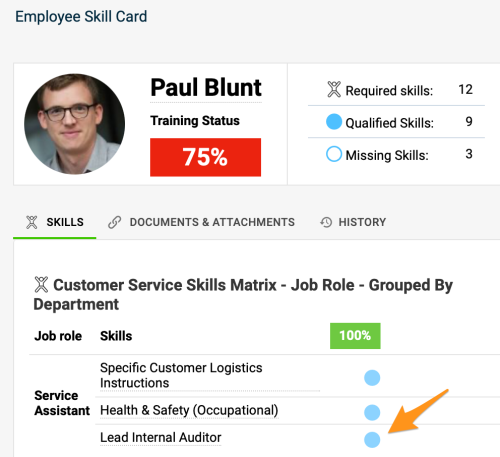
Check the updated skills. The skill is updated in your skill matrices and also in the employees’ skill cards.
通过批量上传,更高效地更新用户的技能。您可以更新技能、达到的等级、状态或到期日期。
-
打开批量导入。 在技能矩阵模块的子菜单中选择培训状态批量导入。
请注意,使用此功能需要相应权限。
-
定义列标题。 选择剪贴板,定义列标题(例如用户、技能等)。
-
输入员工数据。 在各行中输入员工信息(如有需要,可以复制粘贴)。
-
导入数据。 点击导入按钮。
-
检查已更新的技能。 技能会在技能矩阵以及员工的技能卡中同步更新。
还需要帮助吗?
请给我们留言。工作日我们通常会在一小时内回复。