Visão geral das funções de usuário
Tradução automática do inglês. Exibindo o original em inglês.
The following features let you search for specific rights among the existing roles in the system and view all roles and privileges in a unified display, so you can manage and review every detail from a single place.
Search for specific rights among the roles
-
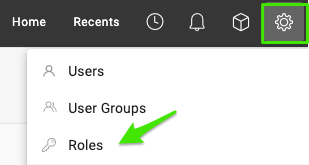
Open the roles. Go to Settings and select Roles.
-
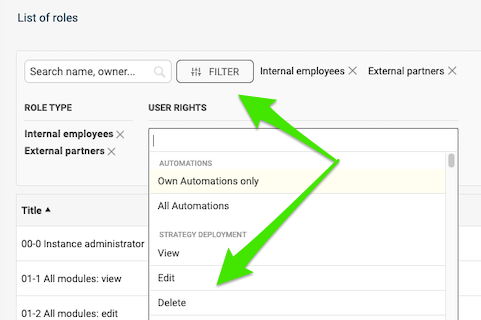
Filter by rights. Click Filter, select your criteria and choose the specific rights you want to check.
-
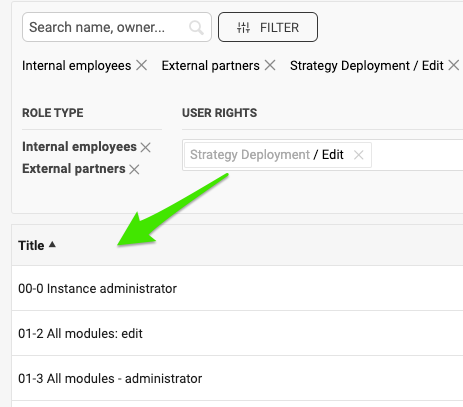
Review the matching roles. View all the roles configured with these rights.
Compare roles and privileges
-
Open the roles. Go to Settings and select Roles.
-
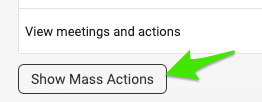
Show the mass actions. Scroll down the list of roles and click Show Mass Actions.
-
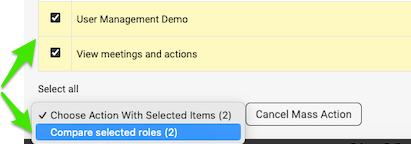
Select the roles to compare. Tick the box next to the roles you want to view and compare. Then click Compare selected roles in the submenu.
-
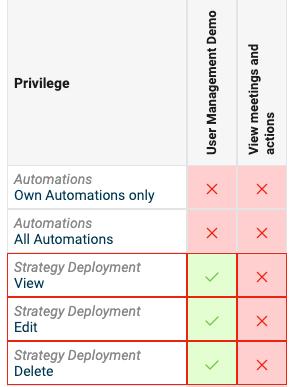
Review the comparison. View the roles displayed for comparison.
Os recursos a seguir permitem procurar permissões específicas entre as funções existentes no sistema e ver todas as funções e privilégios em uma única tela, para que você gerencie e revise cada detalhe em um só lugar.
Procure permissões específicas entre as funções
-
Abra as funções. Acesse Configurações e selecione Funções.
-
Filtre por permissões. Clique em Filtro, selecione os critérios e escolha as permissões específicas que deseja verificar.
-
Revise as funções encontradas. Veja todas as funções configuradas com essas permissões.
Compare funções e privilégios
-
Abra as funções. Acesse Configurações e selecione Funções.
-
Mostre as ações em massa. Role a lista de funções para baixo e clique em Mostrar ações em massa.
-
Selecione as funções a comparar. Marque a caixa ao lado das funções que deseja ver e comparar. Depois, clique em Comparar funções selecionadas no submenu.
-
Revise a comparação. Veja as funções exibidas lado a lado para comparação.
Precisa de mais ajuda?
Escreva para nós. Em dias úteis, costumamos responder em até uma hora.