Prehľad rolí používateľov
Strojový preklad z angličtiny. Zobrazený je anglický originál.
The following features let you search for specific rights among the existing roles in the system and view all roles and privileges in a unified display, so you can manage and review every detail from a single place.
Search for specific rights among the roles
-
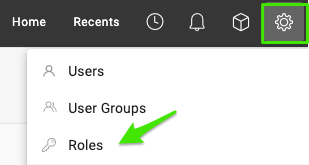
Open the roles. Go to Settings and select Roles.
-
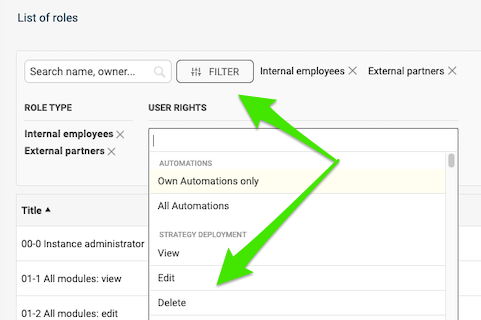
Filter by rights. Click Filter, select your criteria and choose the specific rights you want to check.
-
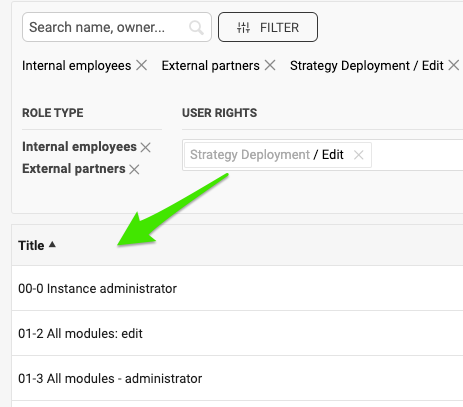
Review the matching roles. View all the roles configured with these rights.
Compare roles and privileges
-
Open the roles. Go to Settings and select Roles.
-
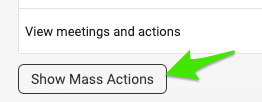
Show the mass actions. Scroll down the list of roles and click Show Mass Actions.
-
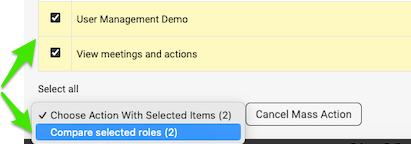
Select the roles to compare. Tick the box next to the roles you want to view and compare. Then click Compare selected roles in the submenu.
-
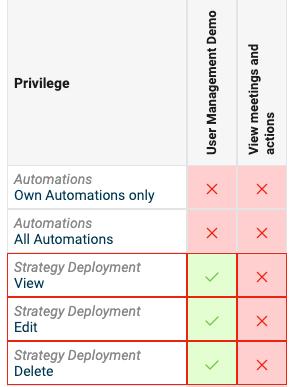
Review the comparison. View the roles displayed for comparison.
Nasledujúce funkcie vám umožnia vyhľadať konkrétne oprávnenia v existujúcich rolách systému a zobraziť všetky roly a práva v jednotnom prehľade. Každý detail tak spravujete a kontrolujete z jedného miesta.
Vyhľadajte konkrétne oprávnenia v rolách
-
Otvorte roly. Prejdite do Nastavení a vyberte Roly.
-
Filtrujte podľa oprávnení. Kliknite na Filter, vyberte kritériá a zvoľte konkrétne oprávnenia, ktoré chcete skontrolovať.
-
Prezrite si zodpovedajúce roly. Zobrazia sa všetky roly, ktoré majú tieto oprávnenia nastavené.
Porovnajte roly a práva
-
Otvorte roly. Prejdite do Nastavení a vyberte Roly.
-
Zobrazte hromadné akcie. Posuňte sa v zozname rolí nadol a kliknite na Zobraziť hromadné akcie.
-
Vyberte roly na porovnanie. Zaškrtnite políčko vedľa rolí, ktoré chcete zobraziť a porovnať. Potom v podmenu kliknite na Porovnať vybrané roly.
-
Prezrite si porovnanie. Pozrite si roly zobrazené vedľa seba na porovnanie.
Potrebujete ďalšiu pomoc?
Napíšte nám. V pracovné dni zvyčajne odpovedáme do hodiny.