用户角色概览
本文由英文机器翻译。 当前显示英文原文。
The following features let you search for specific rights among the existing roles in the system and view all roles and privileges in a unified display, so you can manage and review every detail from a single place.
Search for specific rights among the roles
-
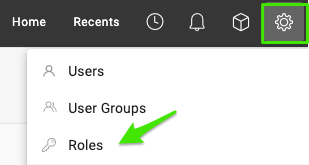
Open the roles. Go to Settings and select Roles.
-
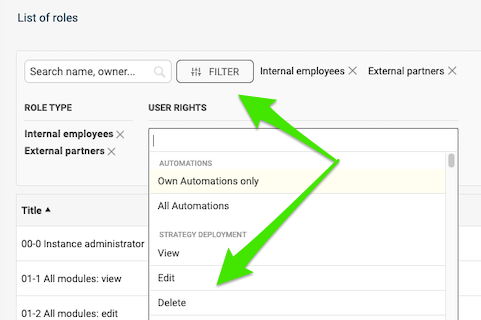
Filter by rights. Click Filter, select your criteria and choose the specific rights you want to check.
-
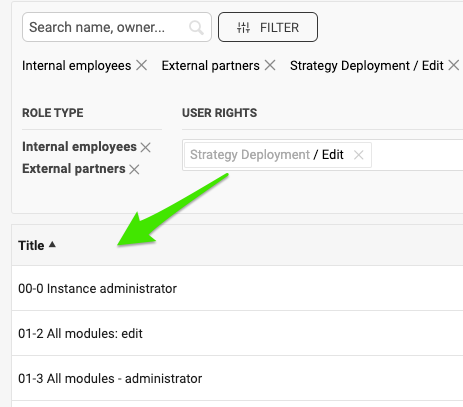
Review the matching roles. View all the roles configured with these rights.
Compare roles and privileges
-
Open the roles. Go to Settings and select Roles.
-
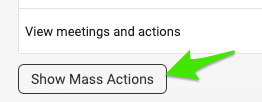
Show the mass actions. Scroll down the list of roles and click Show Mass Actions.
-
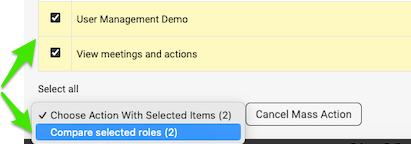
Select the roles to compare. Tick the box next to the roles you want to view and compare. Then click Compare selected roles in the submenu.
-
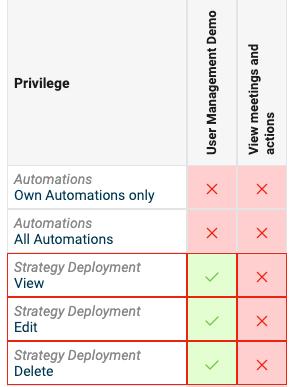
Review the comparison. View the roles displayed for comparison.
以下功能可让您在系统现有角色中搜索特定权限,并在统一视图中查看所有角色和权限,从而在一个地方管理和检查所有细节。
在角色中搜索特定权限
-
打开角色。 进入设置,选择角色。
-
按权限筛选。 点击筛选,选择条件并选中要检查的具体权限。
-
查看匹配的角色。 查看配置了这些权限的所有角色。
比较角色和权限
-
打开角色。 进入设置,选择角色。
-
显示批量操作。 在角色列表中向下滚动,点击显示批量操作。
-
选择要比较的角色。 勾选要查看和比较的角色旁边的复选框。然后在子菜单中点击比较所选角色。
-
查看比较结果。 查看列出以供比较的角色。
还需要帮助吗?
请给我们留言。工作日我们通常会在一小时内回复。