Como exibir totais em um dashboard
Tradução automática do inglês. Exibindo o original em inglês.
To display totals in your dashboard, follow these steps:
-
Open the dashboard settings. Click the dashboard Edit icon.

-
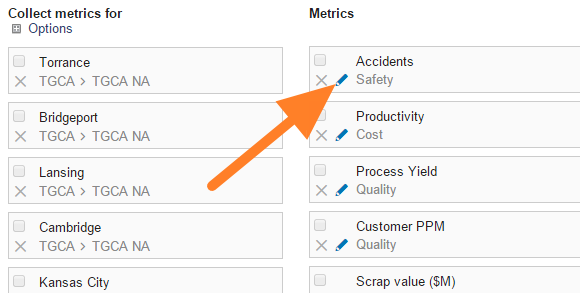
Edit the metric. Click the Edit icon of the particular metric.
-
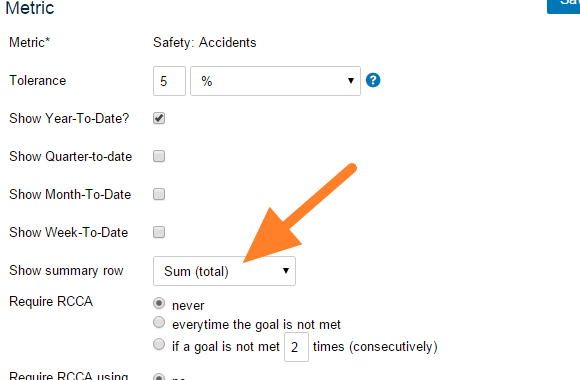
Turn on the summary row. Set Show summary row.
-
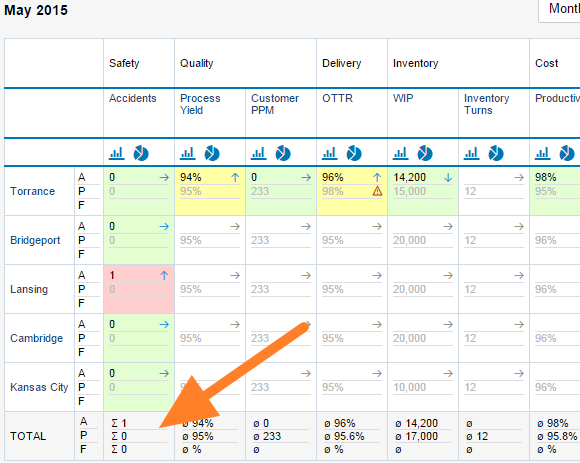
Save and view the dashboard. Click Save, then Save & View.
Para exibir totais no dashboard, siga estes passos:
-
Abra as configurações do dashboard. Clique no ícone Editar do dashboard.
-
Edite a métrica. Clique no ícone Editar da métrica desejada.
-
Ative a linha de resumo. Ative Mostrar linha de resumo.
-
Salve e visualize o dashboard. Clique em Salvar e depois em Salvar e visualizar.
Precisa de mais ajuda?
Escreva para nós. Em dias úteis, costumamos responder em até uma hora.