Afficher les totaux dans un tableau de bord
Traduction automatique de l'anglais. Original en anglais affiché.
To display totals in your dashboard, follow these steps:
-
Open the dashboard settings. Click the dashboard Edit icon.

-
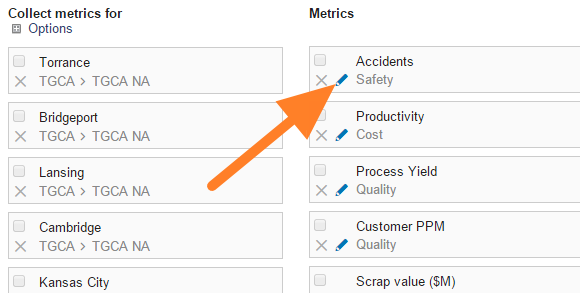
Edit the metric. Click the Edit icon of the particular metric.
-
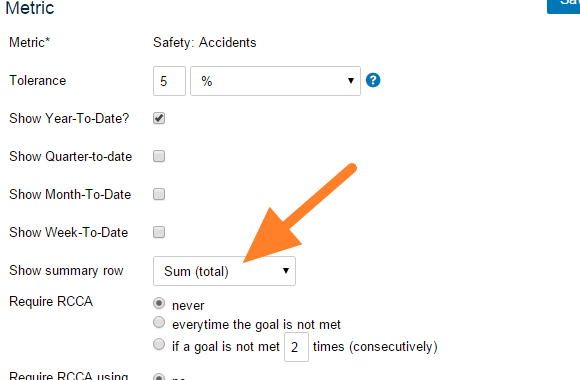
Turn on the summary row. Set Show summary row.
-
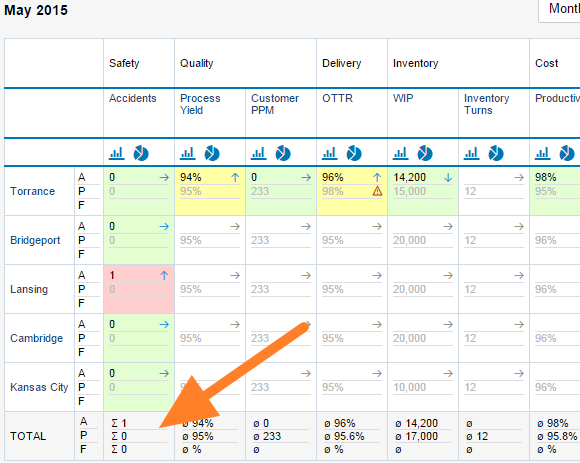
Save and view the dashboard. Click Save, then Save & View.
Pour afficher les totaux dans votre tableau de bord, procédez comme suit :
-
Ouvrez les paramètres du tableau de bord. Cliquez sur l’icône Modifier du tableau de bord.
-
Modifiez l’indicateur. Cliquez sur l’icône Modifier de l’indicateur concerné.
-
Activez la ligne de total. Activez Afficher la ligne de total.
-
Enregistrez et affichez le tableau de bord. Cliquez sur Enregistrer, puis sur Enregistrer et afficher.
Besoin d'aide supplémentaire ?
Écrivez-nous. Les jours ouvrés, nous répondons en général en moins d'une heure.