Cómo mostrar los totales en un dashboard
Traducción automática del inglés. Se muestra el original en inglés.
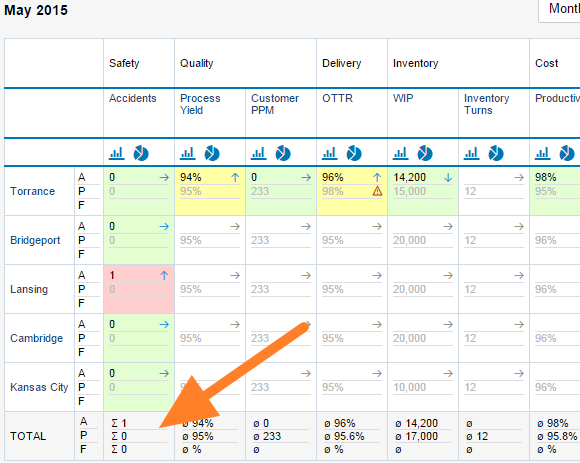
To display totals in your dashboard, follow these steps:
-
Open the dashboard settings. Click the dashboard Edit icon.

-
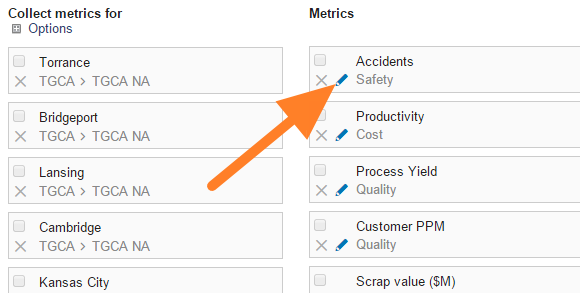
Edit the metric. Click the Edit icon of the particular metric.
-
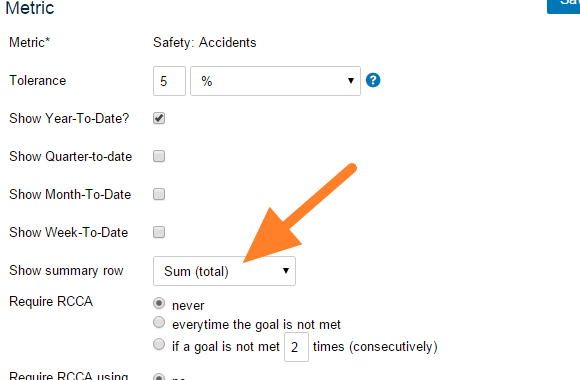
Turn on the summary row. Set Show summary row.
-
Save and view the dashboard. Click Save, then Save & View.
Para mostrar los totales en su dashboard, siga estos pasos:
-
Abra la configuración del dashboard. Haga clic en el ícono Editar del dashboard.
-
Edite el indicador. Haga clic en el ícono Editar del indicador correspondiente.
-
Active la fila de resumen. Active Mostrar fila de resumen.
-
Guarde y vea el dashboard. Haga clic en Guardar y luego en Guardar y ver.
¿Necesita más ayuda?
Escríbanos. En días laborables solemos responder en menos de una hora.