How to set up users to be informed about a quality problem
To manage quality issues effectively, it is essential to notify the right people. The Quality Alerts module lets you choose the users or groups to be informed about quality alerts, which ensures timely communication and response.
This guide shows you how to set up these notifications to keep all relevant stakeholders informed.
-
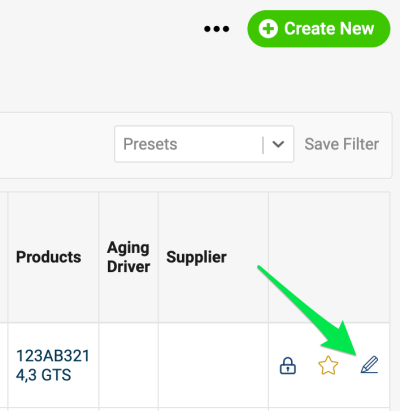
Open the alert for editing. Go to the edit screen of a quality alert document.
-
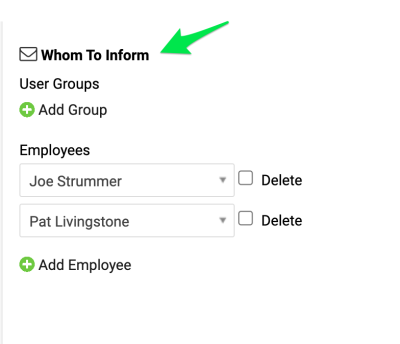
Choose whom to inform. In Whom To Inform, select a user group, if one has been created (where to set up a new user group), or select individual employees.
-
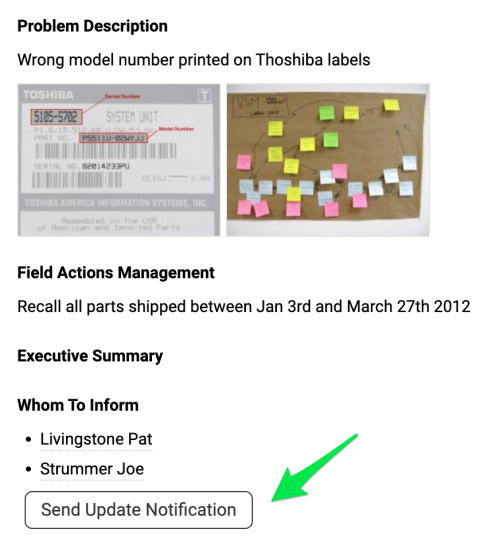
Send the notification. When you are ready to send a notification, click the Send Update Notification button. All selected people receive an email about the new quality alert or its update.
Still need help?
Write to us. We usually reply within an hour on business days.