如何设置质量问题的通知人员
本文由英文机器翻译。 当前显示英文原文。
To manage quality issues effectively, it is essential to notify the right people. The Quality Alerts module lets you choose the users or groups to be informed about quality alerts, which ensures timely communication and response.
This guide shows you how to set up these notifications to keep all relevant stakeholders informed.
-
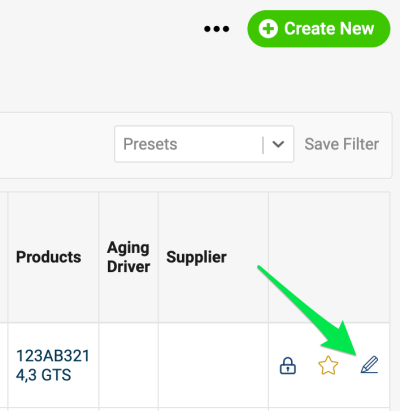
Open the alert for editing. Go to the edit screen of a quality alert document.
-
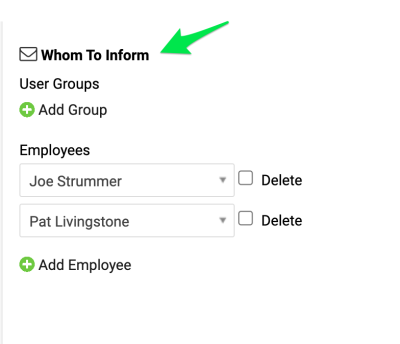
Choose whom to inform. In Whom To Inform, select a user group, if one has been created (where to set up a new user group), or select individual employees.
-
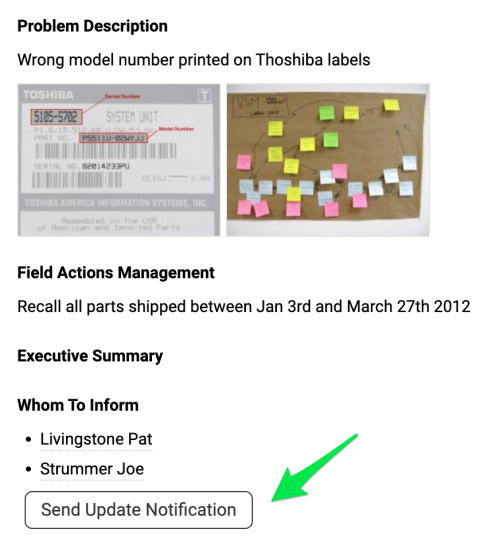
Send the notification. When you are ready to send a notification, click the Send Update Notification button. All selected people receive an email about the new quality alert or its update.
要有效处理质量问题,关键是通知到合适的人。在 质量警报 模块中,您可以选择接收质量警报通知的用户或用户组,确保信息及时传达、问题及时响应。
本文介绍如何设置这些通知,让所有相关人员随时了解情况。
-
打开警报编辑界面。 进入质量警报文档的编辑界面。
-
选择通知对象。 在 通知对象 中选择用户组(如已创建,参见在哪里设置新用户组),或选择单个员工。
-
发送通知。 准备好发送通知时,点击 发送更新通知 按钮。所有选定人员都会收到关于新质量警报或其更新的电子邮件。
还需要帮助吗?
请给我们留言。工作日我们通常会在一小时内回复。