Wie ändere ich den Status einer Qualifikation?
Maschinelle Übersetzung aus dem Englischen. Englisches Original wird angezeigt.
-
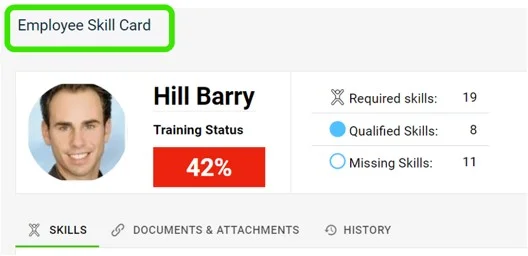
Find the skill on the skill card. Go to the employee’s skill card and scroll down to the skill that needs updating.
-
Click the progress circle. Click the progress circle next to the skill you want to update.
-
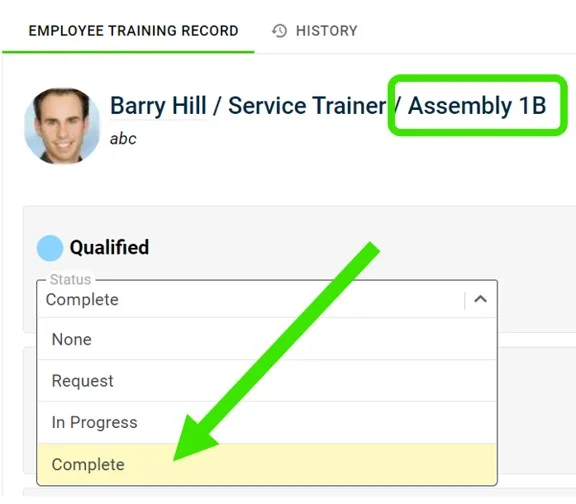
Open the status drop-down. Click the status drop-down of each requirement, as shown:
-
Select the complete status. Click the complete status to indicate that the employee is qualified in that skill.
-
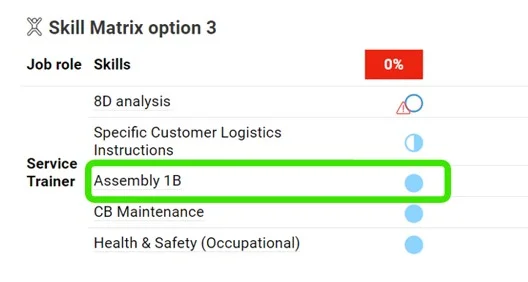
Check the changed status. The status is changed as shown below:
-
Suchen Sie die Qualifikation auf der Qualifikationskarte. Öffnen Sie die Qualifikationskarte des Mitarbeiters und scrollen Sie zu der Qualifikation, die Sie aktualisieren möchten.
-
Klicken Sie auf den Fortschrittskreis. Klicken Sie auf den Fortschrittskreis neben der Qualifikation, die Sie aktualisieren möchten.
-
Öffnen Sie die Statusauswahl. Klicken Sie bei jeder Anforderung auf die Dropdown-Liste für den Status, wie gezeigt:
-
Wählen Sie den Status „erfüllt“. Klicken Sie auf den Status „erfüllt“, um anzugeben, dass der Mitarbeiter für diese Qualifikation qualifiziert ist.
-
Prüfen Sie den geänderten Status. Der Status wird wie unten gezeigt geändert:
Brauchen Sie weitere Hilfe?
Schreiben Sie uns. An Werktagen antworten wir meist innerhalb einer Stunde.