如何更改技能状态?
本文由英文机器翻译。 当前显示英文原文。
-
Find the skill on the skill card. Go to the employee’s skill card and scroll down to the skill that needs updating.
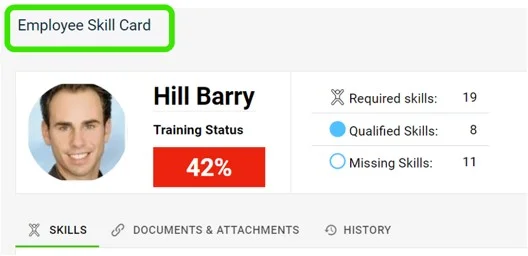
-
Click the progress circle. Click the progress circle next to the skill you want to update.
-
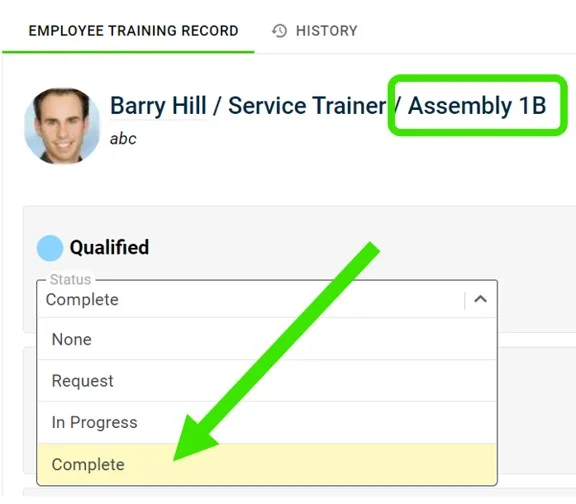
Open the status drop-down. Click the status drop-down of each requirement, as shown:
-
Select the complete status. Click the complete status to indicate that the employee is qualified in that skill.
-
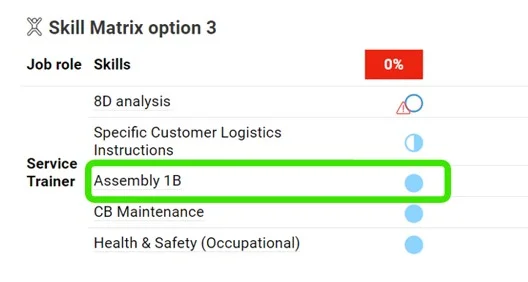
Check the changed status. The status is changed as shown below:
-
在技能卡上找到技能。 打开员工的技能卡,向下滚动到需要更新的技能。
-
点击进度圆圈。 点击要更新的技能旁边的进度圆圈。
-
打开状态下拉菜单。 点击每项要求的状态下拉菜单,如下图所示:
-
选择完成状态。 点击完成状态,表示该员工已具备这项技能的资格。
-
检查更改后的状态。 状态已按下图更改:
还需要帮助吗?
请给我们留言。工作日我们通常会在一小时内回复。