Ako zmeniť stav zručnosti?
Strojový preklad z angličtiny. Zobrazený je anglický originál.
-
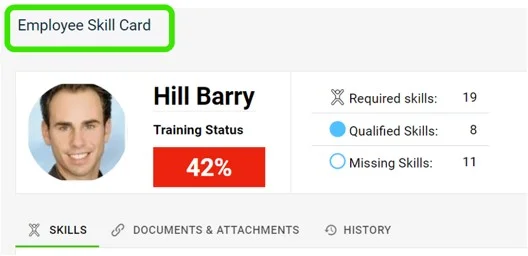
Find the skill on the skill card. Go to the employee’s skill card and scroll down to the skill that needs updating.
-
Click the progress circle. Click the progress circle next to the skill you want to update.
-
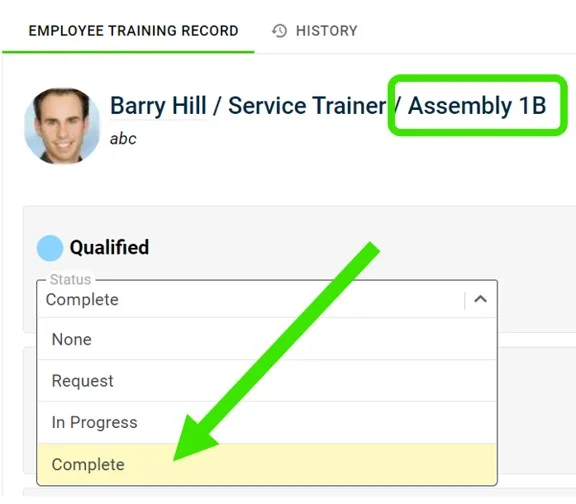
Open the status drop-down. Click the status drop-down of each requirement, as shown:
-
Select the complete status. Click the complete status to indicate that the employee is qualified in that skill.
-
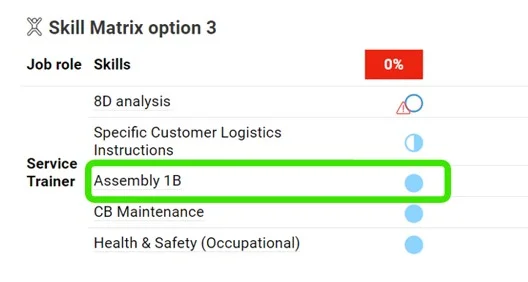
Check the changed status. The status is changed as shown below:
-
Nájdite zručnosť na karte zručností. Otvorte kartu zručností zamestnanca a posuňte sa k zručnosti, ktorú treba aktualizovať.
-
Kliknite na kruh priebehu. Kliknite na kruh priebehu vedľa zručnosti, ktorú chcete aktualizovať.
-
Otvorte rozbaľovací zoznam stavu. Pri každej požiadavke kliknite na rozbaľovací zoznam stavu:
-
Zvoľte stav splnené. Kliknutím na stav splnené označíte, že zamestnanec je v tejto zručnosti kvalifikovaný.
-
Skontrolujte zmenený stav. Stav sa zmení takto:
Potrebujete ďalšiu pomoc?
Napíšte nám. V pracovné dni zvyčajne odpovedáme do hodiny.