Cómo registrar la asistencia y el historial de la agenda de una reunión
Traducción automática del inglés. Se muestra el original en inglés.
-
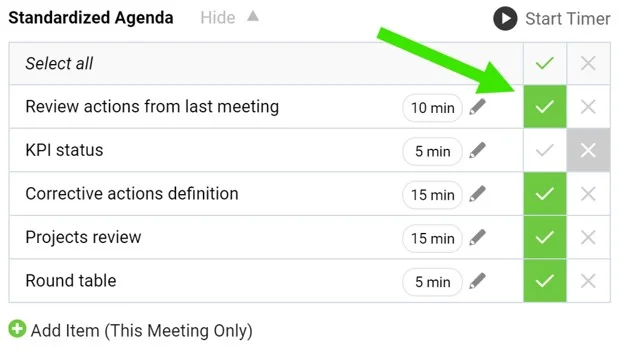
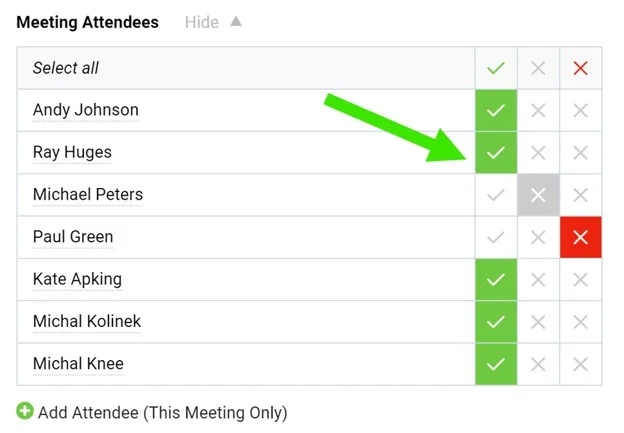
Tick the agenda and attendees. When running a meeting, tick the agenda points that have been discussed as well as the attendees.
-
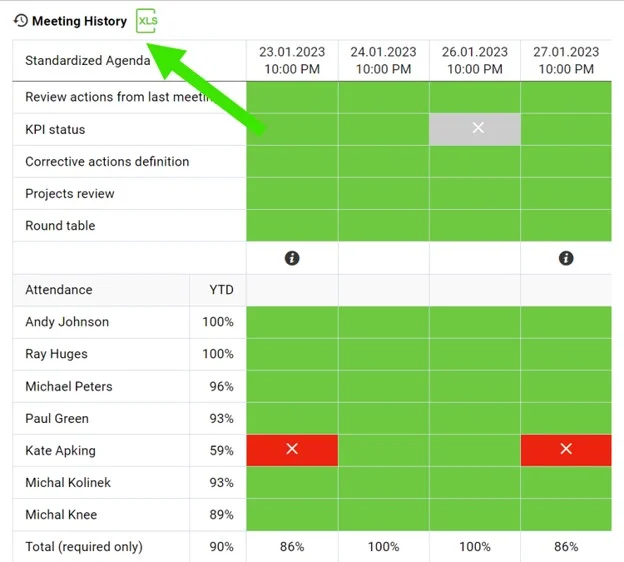
Open the meetings history. Click the Meetings history link to view the dashboard of past meetings. Export it to XLS if needed.
-
Read the color coding. The agenda completion and attendance are color coded.
-
Compare the meetings. Each column stands for one meeting occurrence.
-
Marque la agenda y los asistentes. Durante la reunión, marque los puntos de la agenda que se trataron y a los asistentes.
-
Abra el historial de reuniones. Haga clic en el enlace Historial de reuniones para ver el dashboard de las reuniones anteriores. Si lo necesita, expórtelo a XLS.
-
Interprete los colores. El cumplimiento de la agenda y la asistencia se muestran con un código de colores.
-
Compare las reuniones. Cada columna corresponde a una sesión de la reunión.
¿Necesita más ayuda?
Escríbanos. En días laborables solemos responder en menos de una hora.