Une section 8D terminée et approuvée peut-elle être modifiée plus tard ? Est-elle verrouillée après approbation ?
Traduction automatique de l'anglais. Original en anglais affiché.
Once you approve a section, the supplier can no longer edit it. However, as the person who issued the 8D, you can still go to the approved section and edit it.
-
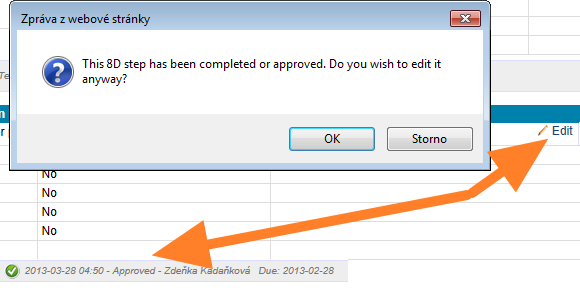
Open the approved section. Go to the approved section and start editing it. The system asks you to confirm that you want to edit the section, although it has been completed and approved.
-
Confirm with OK. Click OK and start editing. The section status changes to In progress.
-
The supplier is notified. At the same time, the supplier receives an email saying that the 8D has been changed. From that moment, the supplier can edit the section as well.
You can edit an approved section only if the whole 8D has not been closed. Once the 8D is closed, nobody can edit any of its sections.
Une fois une section approuvée, le fournisseur ne peut plus la modifier. En revanche, en tant qu’émetteur du 8D, vous pouvez toujours ouvrir la section approuvée et la modifier.
-
Ouvrez la section approuvée. Ouvrez la section approuvée et commencez à la modifier. Le système vous demande de confirmer la modification de cette section, bien qu’elle soit terminée et approuvée.
-
Confirmez avec OK. Cliquez sur OK et commencez la modification. Le statut de la section passe à En cours.
-
Le fournisseur est prévenu. Le fournisseur reçoit en même temps un e-mail indiquant que le 8D a été modifié. À partir de ce moment, il peut lui aussi modifier la section.
Vous ne pouvez modifier une section approuvée que si le 8D n’est pas clôturé. Une fois le 8D clôturé, plus personne ne peut modifier ses sections.
Besoin d'aide supplémentaire ?
Écrivez-nous. Les jours ouvrés, nous répondons en général en moins d'une heure.