Czy sekcję 8D oznaczoną jako ukończona i zatwierdzona można później otworzyć i edytować? Czy po zatwierdzeniu zapis jest zablokowany?
Tłumaczenie maszynowe z angielskiego. Wyświetlany jest oryginał po angielsku.
Once you approve a section, the supplier can no longer edit it. However, as the person who issued the 8D, you can still go to the approved section and edit it.
-
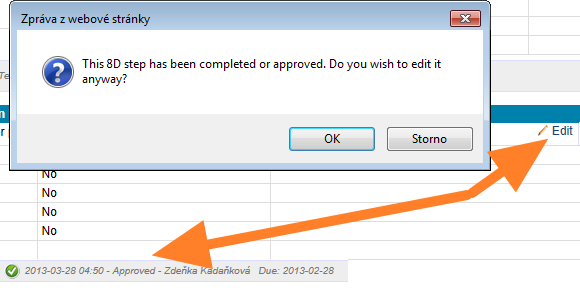
Open the approved section. Go to the approved section and start editing it. The system asks you to confirm that you want to edit the section, although it has been completed and approved.
-
Confirm with OK. Click OK and start editing. The section status changes to In progress.
-
The supplier is notified. At the same time, the supplier receives an email saying that the 8D has been changed. From that moment, the supplier can edit the section as well.
You can edit an approved section only if the whole 8D has not been closed. Once the 8D is closed, nobody can edit any of its sections.
Po zatwierdzeniu sekcji dostawca nie może jej już edytować. Ty jako osoba, która wystawiła 8D, nadal możesz otworzyć zatwierdzoną sekcję i ją edytować.
-
Otwórz zatwierdzoną sekcję. Przejdź do zatwierdzonej sekcji i zacznij ją edytować. System poprosi o potwierdzenie, że chcesz edytować sekcję, mimo że jest ukończona i zatwierdzona.
-
Potwierdź przyciskiem OK. Kliknij OK i zacznij edytować. Status sekcji zmieni się na W toku.
-
Dostawca dostaje powiadomienie. Jednocześnie dostawca otrzymuje e-mail, że 8D zostało zmienione. Od tej chwili dostawca również może edytować sekcję.
Zatwierdzoną sekcję możesz edytować tylko wtedy, gdy całe 8D nie zostało zamknięte. Po zamknięciu 8D nikt nie może edytować żadnej z jego sekcji.
Potrzebujesz dalszej pomocy?
Napisz do nas. W dni robocze zwykle odpowiadamy w ciągu godziny.