已标记为完成并获批准的8D部分以后还能编辑吗?批准后记录会锁定吗?
本文由英文机器翻译。 当前显示英文原文。
Once you approve a section, the supplier can no longer edit it. However, as the person who issued the 8D, you can still go to the approved section and edit it.
-
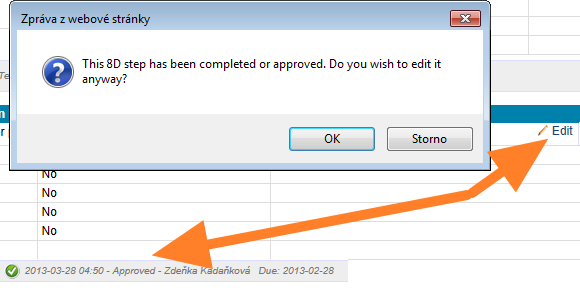
Open the approved section. Go to the approved section and start editing it. The system asks you to confirm that you want to edit the section, although it has been completed and approved.
-
Confirm with OK. Click OK and start editing. The section status changes to In progress.
-
The supplier is notified. At the same time, the supplier receives an email saying that the 8D has been changed. From that moment, the supplier can edit the section as well.
You can edit an approved section only if the whole 8D has not been closed. Once the 8D is closed, nobody can edit any of its sections.
部分获得批准后,供应商就不能再编辑。但作为发起8D的人员,您仍然可以进入已批准的部分进行编辑。
-
打开已批准的部分。 进入已批准的部分并开始编辑。系统会请您确认:虽然该部分已完成并获批准,是否仍要编辑。
-
点击确定。 点击 确定 并开始编辑。该部分的状态会变为 进行中。
-
供应商收到通知。 同时,供应商会收到一封电子邮件,告知8D已被更改。从此时起,供应商也可以编辑该部分。
只有在整个8D尚未关闭时,才能编辑已批准的部分。8D关闭后,任何人都无法编辑其中任何部分。
还需要帮助吗?
请给我们留言。工作日我们通常会在一小时内回复。