Afficher et imprimer le tableau de bord d'un fournisseur ou d'une unité depuis le tableau de bord principal
Traduction automatique de l'anglais. Original en anglais affiché.
When you use a summary dashboard and need to view or print the results for one particular org. unit or supplier only, follow these steps:
-
Open the matrix dashboard. Go to your matrix format dashboard (see How to create a metric dashboard in a matrix format).
-
Click the org. unit or supplier. Click the particular org. unit or supplier.
-
View or print the dashboard. The individual dashboard is displayed, and you can print it to a PDF or MS Excel file.
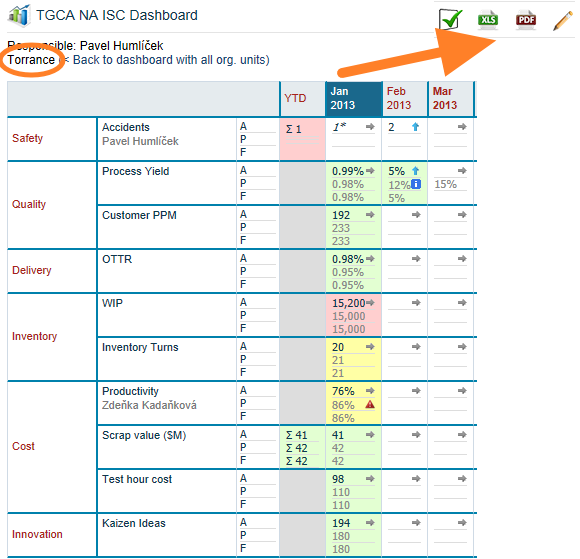
Si vous utilisez un tableau de bord de synthèse et devez consulter ou imprimer les résultats d’une seule unité organisationnelle ou d’un seul fournisseur, procédez comme suit :
-
Ouvrez le tableau de bord matrice. Ouvrez votre tableau de bord au format matrice (voir Créer un tableau de bord KPI au format matrice).
-
Cliquez sur l’unité ou le fournisseur. Cliquez sur l’unité organisationnelle ou le fournisseur concerné.
-
Consultez ou imprimez le tableau de bord. Le tableau de bord individuel s’affiche et vous pouvez l’imprimer en PDF ou dans un fichier MS Excel.
Besoin d'aide supplémentaire ?
Écrivez-nous. Les jours ouvrés, nous répondons en général en moins d'une heure.