Jak zapisać filtr na liście dokumentów
Tłumaczenie maszynowe z angielskiego. Wyświetlany jest oryginał po angielsku.
You can predefine your personal filters in your documents list for easier and faster use.
Please note that other users do not see your filters; they see only their own.
-
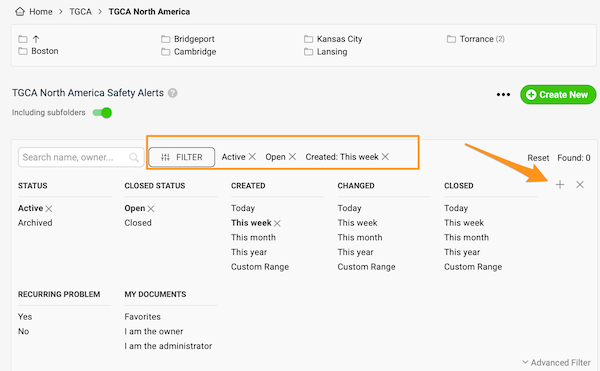
Set up the filter. Click the Filter button in your documents list and choose the options you need. More options are available under Advanced Filter.
-
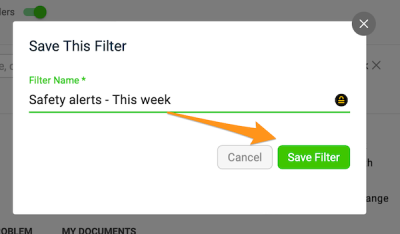
Save the filter. Click the plus button, enter the title of your filter and click Save.
-
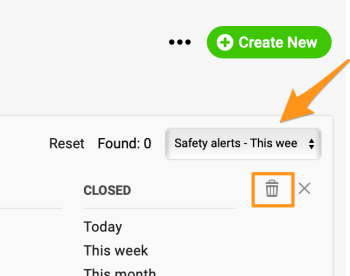
Use or delete a saved filter. Next time you want to use your filter, just select it from the preset filters in the submenu (you can create more than one). To delete a filter, select it from the submenu and click the trash icon.
Na liście dokumentów możesz zapisać własne filtry, aby korzystać z nich szybciej i wygodniej.
Pamiętaj, że inni użytkownicy nie widzą twoich filtrów, a tylko swoje.
-
Ustaw filtr. Kliknij przycisk Filtr na liście dokumentów i wybierz potrzebne opcje. Więcej opcji znajdziesz w Filtrze zaawansowanym.
-
Zapisz filtr. Kliknij przycisk z plusem, wpisz nazwę filtra i kliknij Zapisz.
-
Użyj zapisanego filtra lub go usuń. Gdy następnym razem zechcesz użyć filtra, wybierz go z zapisanych filtrów w podmenu (możesz utworzyć ich kilka). Aby usunąć filtr, wybierz go w podmenu i kliknij ikonę kosza.
Potrzebujesz dalszej pomocy?
Napisz do nas. W dni robocze zwykle odpowiadamy w ciągu godziny.