如何在文档列表中保存筛选条件
本文由英文机器翻译。 当前显示英文原文。
You can predefine your personal filters in your documents list for easier and faster use.
Please note that other users do not see your filters; they see only their own.
-
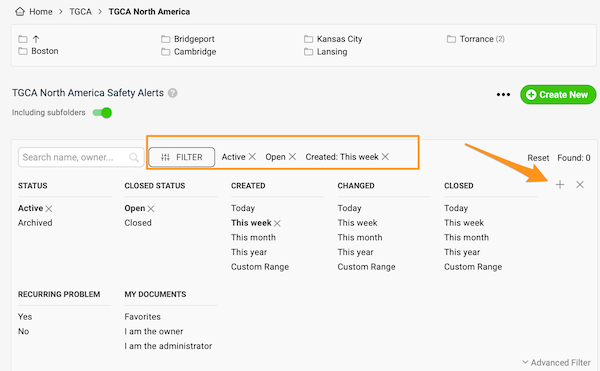
Set up the filter. Click the Filter button in your documents list and choose the options you need. More options are available under Advanced Filter.
-
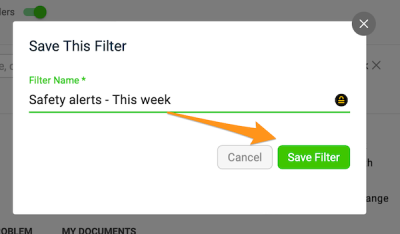
Save the filter. Click the plus button, enter the title of your filter and click Save.
-
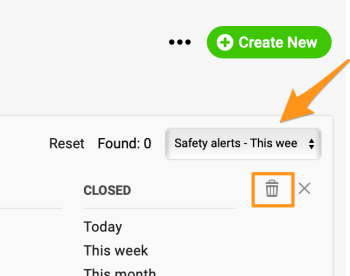
Use or delete a saved filter. Next time you want to use your filter, just select it from the preset filters in the submenu (you can create more than one). To delete a filter, select it from the submenu and click the trash icon.
您可以在文档列表中预设个人筛选条件,使用起来更方便快捷。
请注意,其他用户看不到您的筛选条件,只能看到他们自己的。
-
设置筛选条件。 在文档列表中点击筛选按钮,选择所需选项。高级筛选中还有更多选项。
-
保存筛选条件。 点击加号按钮,输入筛选条件的标题,然后点击保存。
-
使用或删除已保存的筛选条件。 下次需要使用时,只需在子菜单的预设筛选中选择即可(可以创建多个)。要删除筛选条件,请在子菜单中选中它,然后点击垃圾桶图标。
还需要帮助吗?
请给我们留言。工作日我们通常会在一小时内回复。