Jak uložit filtr v seznamu dokumentů
Strojový překlad z angličtiny. Zobrazen anglický originál.
You can predefine your personal filters in your documents list for easier and faster use.
Please note that other users do not see your filters; they see only their own.
-
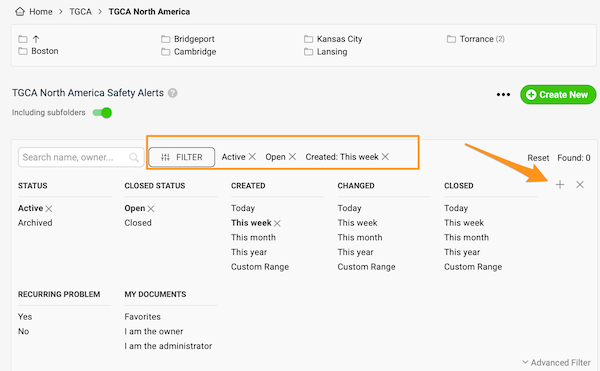
Set up the filter. Click the Filter button in your documents list and choose the options you need. More options are available under Advanced Filter.
-
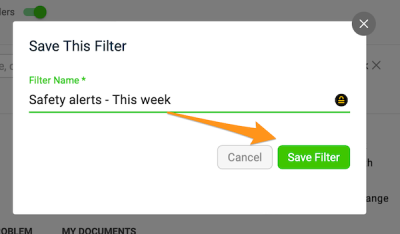
Save the filter. Click the plus button, enter the title of your filter and click Save.
-
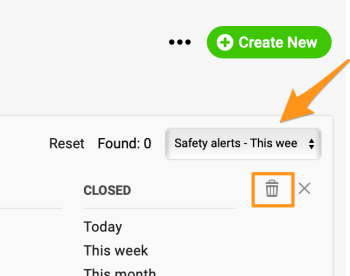
Use or delete a saved filter. Next time you want to use your filter, just select it from the preset filters in the submenu (you can create more than one). To delete a filter, select it from the submenu and click the trash icon.
V seznamu dokumentů si můžete předem nastavit vlastní filtry a používat je rychleji a pohodlněji.
Vaše filtry ostatní uživatelé nevidí; vidí jen své vlastní.
-
Nastavte filtr. V seznamu dokumentů klikněte na tlačítko Filtr a zvolte potřebné možnosti. Další možnosti najdete v Rozšířeném filtru.
-
Uložte filtr. Klikněte na tlačítko plus, zadejte název filtru a klikněte na Uložit.
-
Použijte nebo smažte uložený filtr. Příště filtr jednoduše vyberete z přednastavených filtrů v podmenu (můžete jich vytvořit víc). Filtr smažete tak, že ho v podmenu vyberete a kliknete na ikonu koše.
Potřebujete další pomoc?
Napište nám. V pracovní dny obvykle odpovídáme do hodiny.