Typy aktywności LSW, czas zadań i podsumowanie tygodniowe
Tłumaczenie maszynowe z angielskiego. Wyświetlany jest oryginał po angielsku.
Group similar Leadership Standardized Work (LSW) activities together, capture the duration of each task and monitor the weekly summary view.
Add your activities and time durations
-
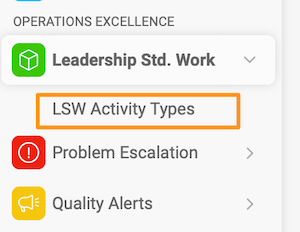
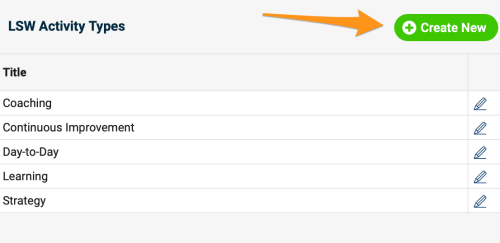
Create a new activity type. To create a new activity besides the existing default options, go to the LSW module submenu, click LSW Activity Types and create a new activity type. Please note that sufficient rights are required.
-
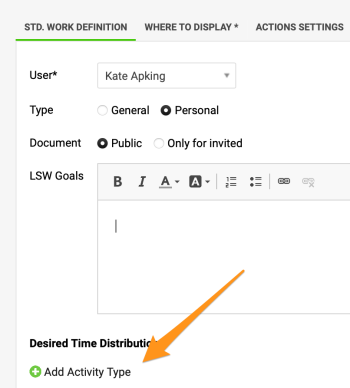
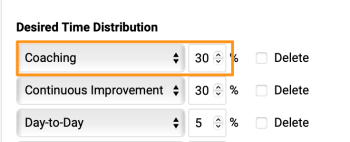
Set up the time distribution plan. Set up the time distribution plan for your weekly summary view.
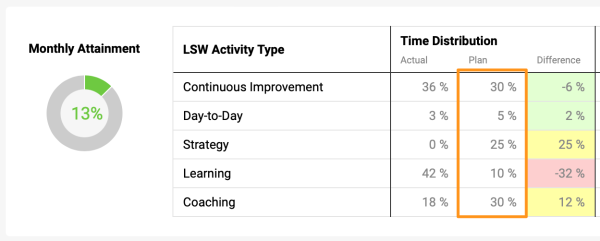
Go to the settings of your document and add the activity type(s) with the assigned time percentage.
-
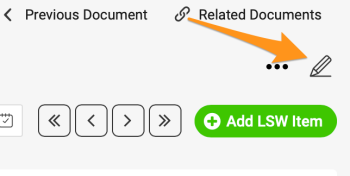
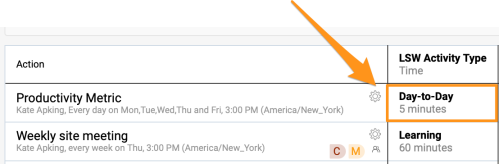
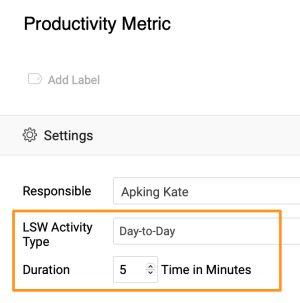
Add an activity to your tasks. Click the settings icon of a task and choose the activity type and the time duration (optional).
-
Monitor the weekly summary view. Monitor the weekly summary view and the monthly attainment percentage.
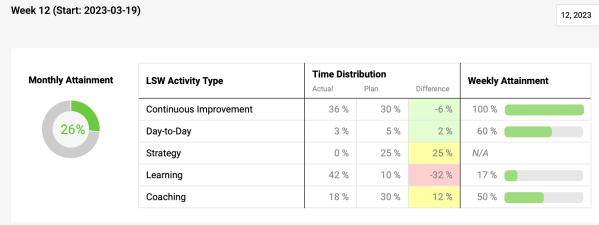
Grupuj podobne aktywności w standardzie pracy lidera (LSW), zapisuj czas trwania każdego zadania i śledź podsumowanie tygodniowe.
Dodaj aktywności i czas ich trwania
-
Utwórz nowy typ aktywności. Aby utworzyć aktywność poza dostępnymi opcjami domyślnymi, w podmenu modułu LSW kliknij Typy aktywności LSW i utwórz nowy typ aktywności. Potrzebujesz do tego odpowiednich uprawnień.
-
Zaplanuj podział czasu. Ustaw plan podziału czasu dla podsumowania tygodniowego.
Otwórz ustawienia dokumentu i dodaj typy aktywności z przypisanym procentem czasu.
-
Przypisz aktywność do zadań. Kliknij ikonę ustawień zadania i wybierz typ aktywności oraz czas trwania (opcjonalnie).
-
Śledź podsumowanie tygodniowe. Śledź podsumowanie tygodniowe i miesięczny procent realizacji.
Potrzebujesz dalszej pomocy?
Napisz do nas. W dni robocze zwykle odpowiadamy w ciągu godziny.