LSW活动类型、任务时长和每周汇总视图
本文由英文机器翻译。 当前显示英文原文。
Group similar Leadership Standardized Work (LSW) activities together, capture the duration of each task and monitor the weekly summary view.
Add your activities and time durations
-
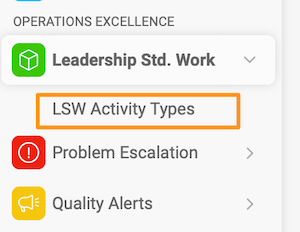
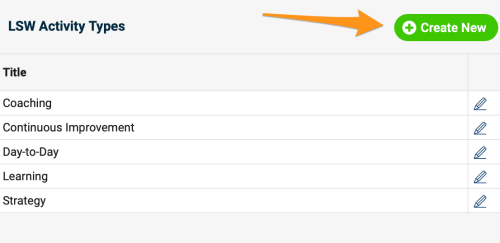
Create a new activity type. To create a new activity besides the existing default options, go to the LSW module submenu, click LSW Activity Types and create a new activity type. Please note that sufficient rights are required.
-
Set up the time distribution plan. Set up the time distribution plan for your weekly summary view.
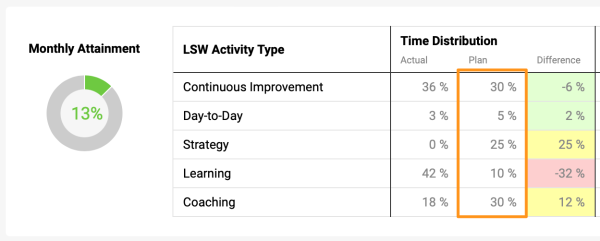
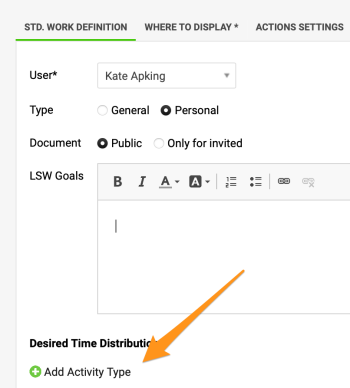
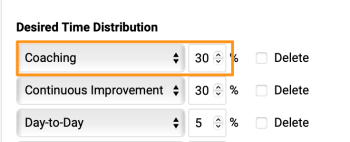
Go to the settings of your document and add the activity type(s) with the assigned time percentage.
-
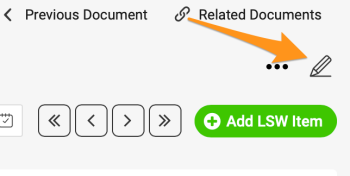
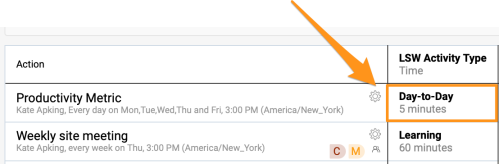
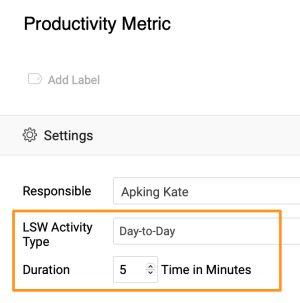
Add an activity to your tasks. Click the settings icon of a task and choose the activity type and the time duration (optional).
-
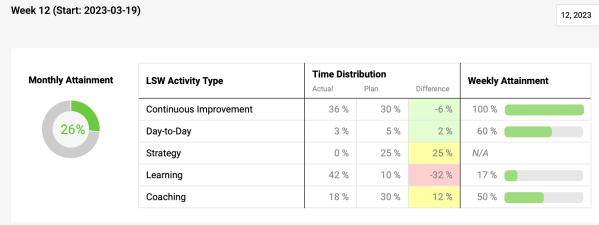
Monitor the weekly summary view. Monitor the weekly summary view and the monthly attainment percentage.
将类似的领导标准工作(LSW)活动归为一组,记录每项任务的时长,并监控每周汇总视图。
添加活动和时长
-
新建活动类型。 要在现有默认选项之外新建活动,请进入LSW模块的子菜单,点击LSW活动类型,然后新建活动类型。请注意,此操作需要相应权限。
-
设置时间分配计划。 为每周汇总视图设置时间分配计划。
进入文档设置,添加活动类型并分配时间百分比。
-
为任务添加活动。 点击任务的设置图标,选择活动类型和时长(可选)。
-
监控每周汇总视图。 监控每周汇总视图和每月达成率。
还需要帮助吗?
请给我们留言。工作日我们通常会在一小时内回复。