Typ aktivity LSW, trvanie úloh a týždenný súhrn
Strojový preklad z angličtiny. Zobrazený je anglický originál.
Group similar Leadership Standardized Work (LSW) activities together, capture the duration of each task and monitor the weekly summary view.
Add your activities and time durations
-
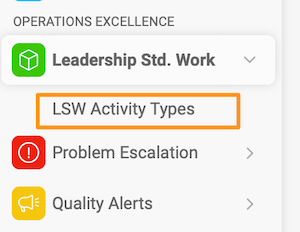
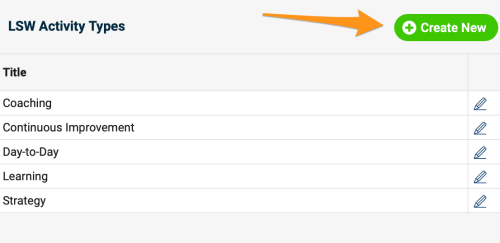
Create a new activity type. To create a new activity besides the existing default options, go to the LSW module submenu, click LSW Activity Types and create a new activity type. Please note that sufficient rights are required.
-
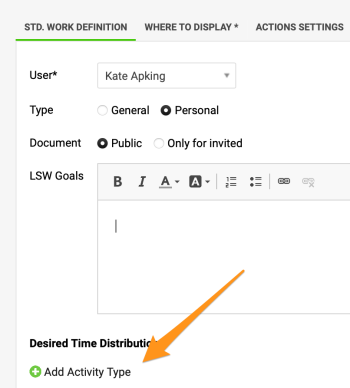
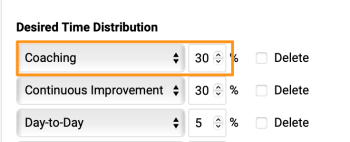
Set up the time distribution plan. Set up the time distribution plan for your weekly summary view.
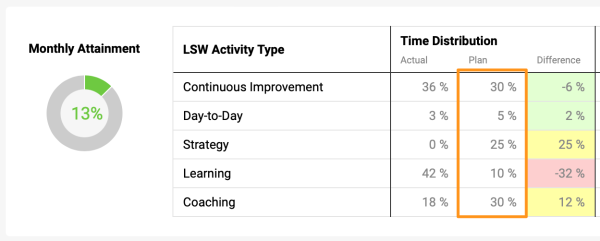
Go to the settings of your document and add the activity type(s) with the assigned time percentage.
-
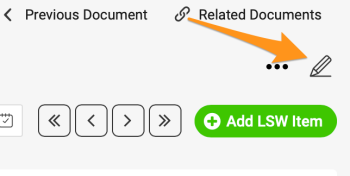
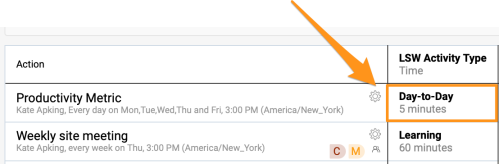
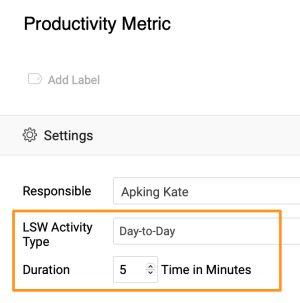
Add an activity to your tasks. Click the settings icon of a task and choose the activity type and the time duration (optional).
-
Monitor the weekly summary view. Monitor the weekly summary view and the monthly attainment percentage.
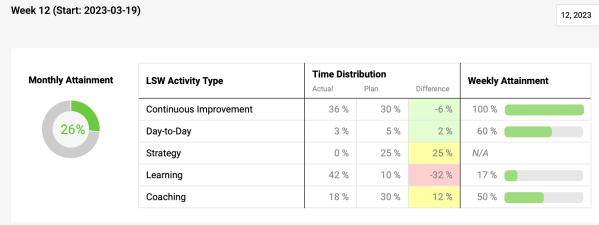
Zoskupte podobné aktivity Štandardu práce vedúcich (LSW), zaznamenávajte trvanie každej úlohy a sledujte týždenný súhrn.
Pridajte aktivity a ich trvanie
-
Vytvorte nový typ aktivity. Ak chcete okrem predvolených možností vytvoriť novú aktivitu, prejdite do podmenu modulu LSW, kliknite na Typy aktivít LSW a vytvorte nový typ aktivity. Potrebujete na to dostatočné oprávnenia.
-
Nastavte plán rozdelenia času. Nastavte plán rozdelenia času pre týždenný súhrn.
Otvorte nastavenia dokumentu a pridajte typ alebo typy aktivít s prideleným percentom času.
-
Priraďte aktivitu k úlohám. Kliknite na ikonu nastavení úlohy a vyberte typ aktivity a trvanie (nepovinné).
-
Sledujte týždenný súhrn. Sledujte týždenný súhrn a mesačné percento plnenia.
Potrebujete ďalšiu pomoc?
Napíšte nám. V pracovné dni zvyčajne odpovedáme do hodiny.