Flagi ważności
Tłumaczenie maszynowe z angielskiego. Wyświetlany jest oryginał po angielsku.
You can highlight your Quality Alert, 8D and RCCA documents with a severity flag. Once your documents are marked, you can also filter them by flag.
You can either select one of the already existing flags, or create and customize your own flag (a sufficient role is needed).
Mark a document with a flag
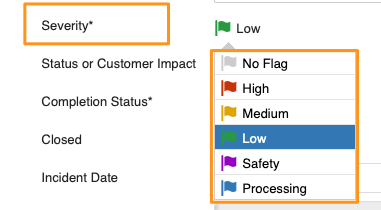
Select the flag from the options in the Severity field.
Filter documents by flag
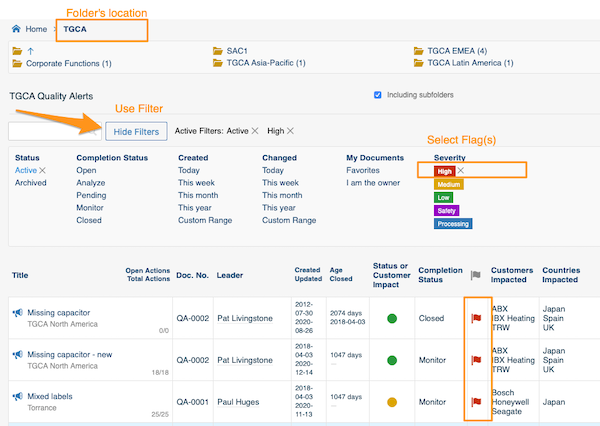
Select your folder, click Show filters and choose the flag. You will then see all the documents in the system that match your folder’s location and the selected flag(s).
Create a custom flag
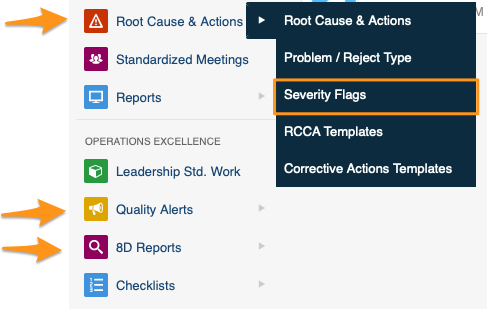
Sufficient rights are required. Click your module (Root Cause & Actions, Quality Alerts or 8D Reports) and choose Severity Flags from the submenu.
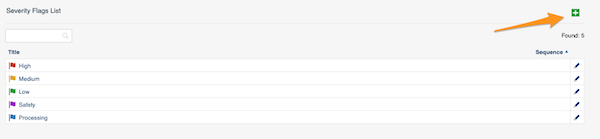
Then click the green plus button in the upper right corner and create your flag.
Dokumenty w modułach Alerty jakości, Raporty 8D i RCCA możesz oznaczyć flagą ważności. Oznaczone dokumenty możesz potem filtrować według flagi.
Wybierz jedną z istniejących flag albo utwórz i dostosuj własną (potrzebna jest odpowiednia rola).
Oznacz dokument flagą
Wybierz flagę z listy w polu Ważność.
Filtruj dokumenty według flagi
Wybierz folder, kliknij Pokaż filtry i wybierz flagę. Zobaczysz wszystkie dokumenty w systemie, które pasują do lokalizacji folderu i wybranych flag.
Utwórz własną flagę
Potrzebne są odpowiednie uprawnienia. Kliknij moduł (Analiza przyczyn i działania korygujące, Alerty jakości lub Raporty 8D) i wybierz z podmenu Flagi ważności.
Następnie kliknij zielony przycisk z plusem w prawym górnym rogu i utwórz flagę.
Potrzebujesz dalszej pomocy?
Napisz do nas. W dni robocze zwykle odpowiadamy w ciągu godziny.