严重程度标记
本文由英文机器翻译。 当前显示英文原文。
You can highlight your Quality Alert, 8D and RCCA documents with a severity flag. Once your documents are marked, you can also filter them by flag.
You can either select one of the already existing flags, or create and customize your own flag (a sufficient role is needed).
Mark a document with a flag
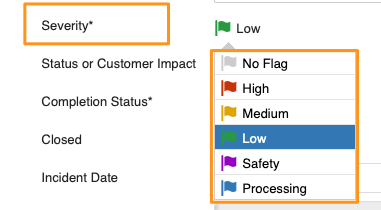
Select the flag from the options in the Severity field.
Filter documents by flag
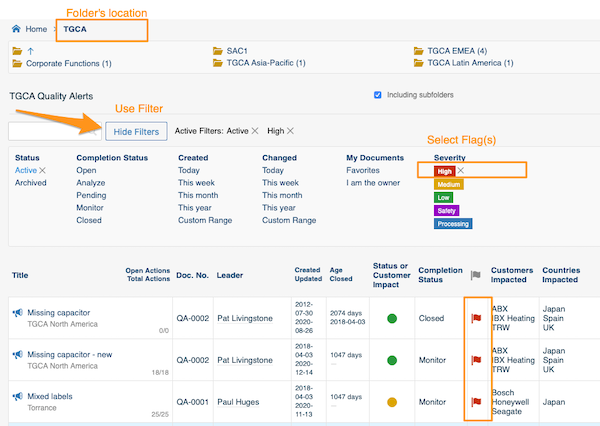
Select your folder, click Show filters and choose the flag. You will then see all the documents in the system that match your folder’s location and the selected flag(s).
Create a custom flag
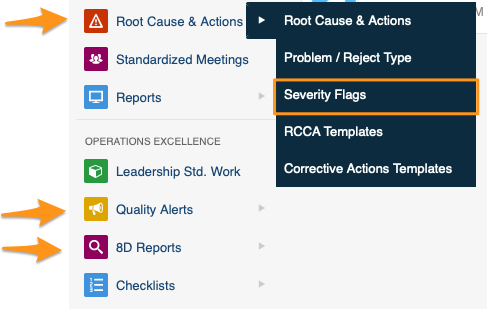
Sufficient rights are required. Click your module (Root Cause & Actions, Quality Alerts or 8D Reports) and choose Severity Flags from the submenu.
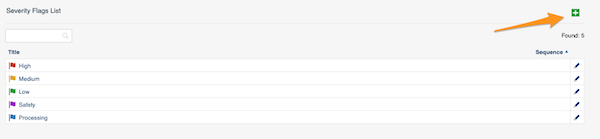
Then click the green plus button in the upper right corner and create your flag.
您可以使用严重程度标记突出显示质量警报、8D和RCCA文档。文档标记后,还可以按标记筛选。
您可以选择现有的标记,也可以创建并自定义自己的标记(需要具备相应的角色)。
为文档添加标记
在严重程度字段的选项中选择标记。
按标记筛选文档
选择文件夹,点击显示筛选,然后选择标记。您将看到系统中所有符合该文件夹位置和所选标记的文档。
创建自定义标记
需要具备相应的权限。点击所在模块(根本原因和措施、质量警报或8D报告),并从子菜单中选择严重程度标记。
然后点击右上角的绿色加号按钮,创建标记。
还需要帮助吗?
请给我们留言。工作日我们通常会在一小时内回复。