Vlajky závažnosti
Strojový preklad z angličtiny. Zobrazený je anglický originál.
You can highlight your Quality Alert, 8D and RCCA documents with a severity flag. Once your documents are marked, you can also filter them by flag.
You can either select one of the already existing flags, or create and customize your own flag (a sufficient role is needed).
Mark a document with a flag
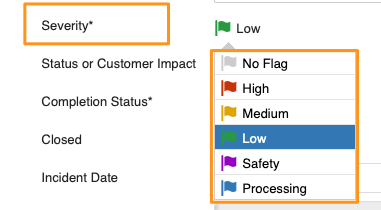
Select the flag from the options in the Severity field.
Filter documents by flag
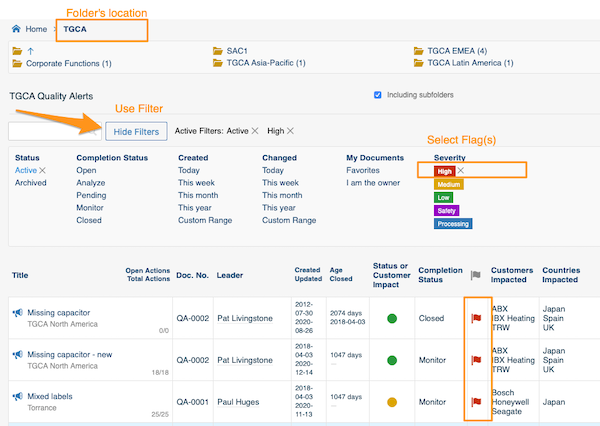
Select your folder, click Show filters and choose the flag. You will then see all the documents in the system that match your folder’s location and the selected flag(s).
Create a custom flag
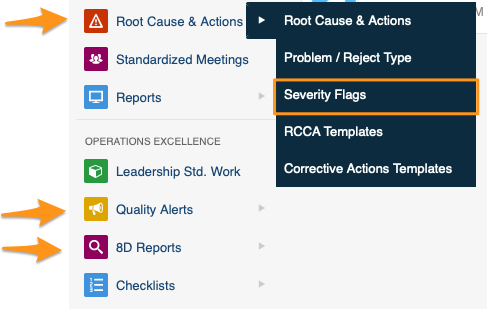
Sufficient rights are required. Click your module (Root Cause & Actions, Quality Alerts or 8D Reports) and choose Severity Flags from the submenu.
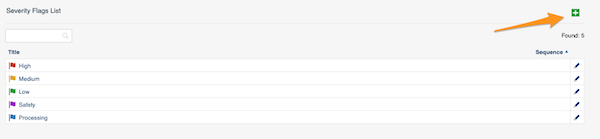
Then click the green plus button in the upper right corner and create your flag.
Dokumenty v Alertoch kvality, 8D reportoch a v Analýze príčin a nápravných opatreniach môžete zvýrazniť vlajkou závažnosti. Označené dokumenty potom môžete podľa vlajky aj filtrovať.
Môžete vybrať niektorú z existujúcich vlajok alebo si vytvoriť a upraviť vlastnú (na to potrebujete dostatočnú rolu).
Označte dokument vlajkou
Vlajku vyberte z možností v poli Závažnosť.
Filtrujte dokumenty podľa vlajky
Vyberte priečinok, kliknite na Zobraziť filtre a zvoľte vlajku. Zobrazia sa všetky dokumenty v systéme, ktoré zodpovedajú umiestneniu priečinka a vybraným vlajkám.
Vytvorte vlastnú vlajku
Potrebujete na to dostatočné oprávnenia. Kliknite na modul (Analýza príčin a nápravné opatrenia, Alerty kvality alebo 8D reporty) a v podmenu vyberte Vlajky závažnosti.
Potom kliknite na zelené tlačidlo plus v pravom hornom rohu a vytvorte vlajku.
Potrebujete ďalšiu pomoc?
Napíšte nám. V pracovné dni zvyčajne odpovedáme do hodiny.