How to set up a job role?
Define your job roles with skills and required levels. (Video guide: learn about job roles – 16:30)
Once you set up a job role, you can easily generate skill matrices where all its skills are listed automatically. Likewise, any change made to a job role replaces the existing information in all skill matrices. You can also set distinct required levels for specific skills within each job role, which changes how the coverage percentages are calculated.
-
Create the skills and levels first. Before you set up a job role, the skills and skill levels must be created in the system (see How to create a new skill and How to set up a skill level).
-
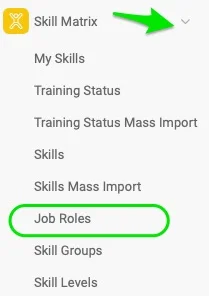
Open the job roles. Click the Skill Matrix module and select Job Roles from the submenu.
-
Add a job role. Click the green plus button in the upper right corner and define the job role’s Title and Location(s).

-
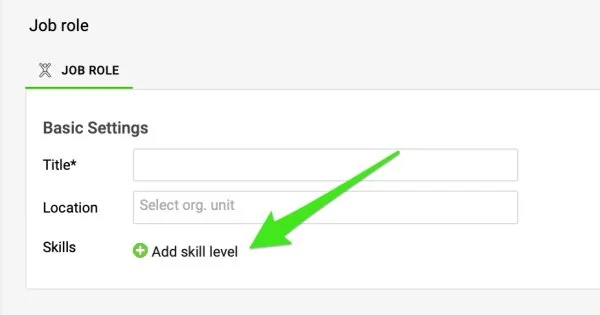
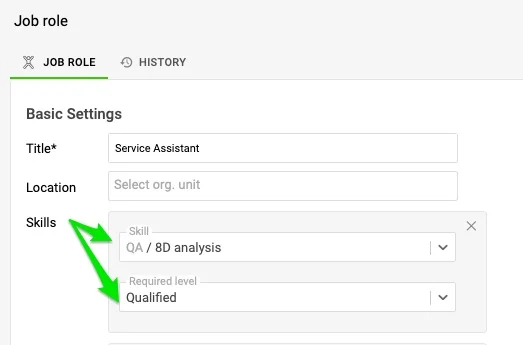
Define the skills and required levels. Click the Add skill level button to add skills, and choose the skills and their required levels from the submenu. The skills and skill levels must already exist in the system, as described in the first step.
-
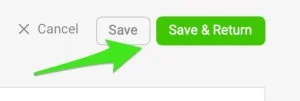
Save the job role. Click the Save & Return button in the upper right corner.
Still need help?
Write to us. We usually reply within an hour on business days.