如何设置岗位角色?
本文由英文机器翻译。 当前显示英文原文。
Define your job roles with skills and required levels. (Video guide: learn about job roles – 16:30)
Once you set up a job role, you can easily generate skill matrices where all its skills are listed automatically. Likewise, any change made to a job role replaces the existing information in all skill matrices. You can also set distinct required levels for specific skills within each job role, which changes how the coverage percentages are calculated.
-
Create the skills and levels first. Before you set up a job role, the skills and skill levels must be created in the system (see How to create a new skill and How to set up a skill level).
-
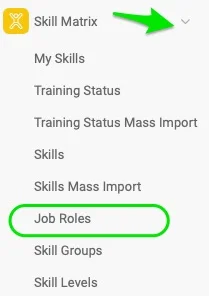
Open the job roles. Click the Skill Matrix module and select Job Roles from the submenu.
-
Add a job role. Click the green plus button in the upper right corner and define the job role’s Title and Location(s).

-
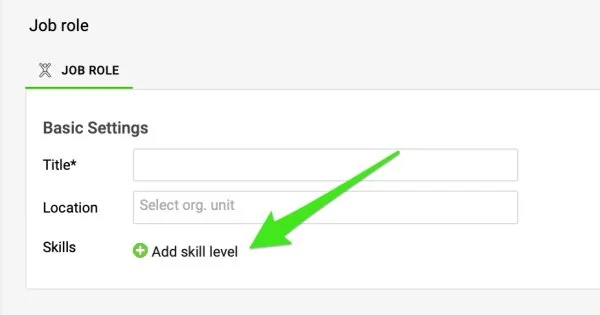
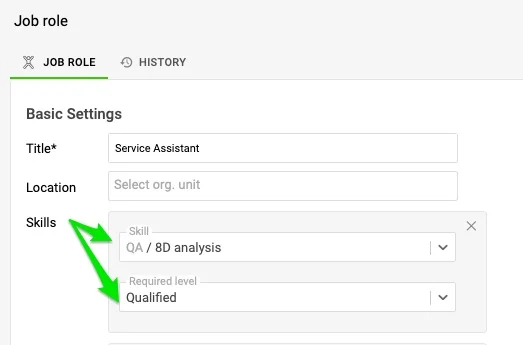
Define the skills and required levels. Click the Add skill level button to add skills, and choose the skills and their required levels from the submenu. The skills and skill levels must already exist in the system, as described in the first step.
-
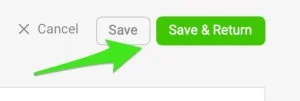
Save the job role. Click the Save & Return button in the upper right corner.
为岗位角色定义技能和所需等级。(视频指南:了解岗位角色,16:30)
设置岗位角色后,即可轻松生成技能矩阵,其所有技能都会自动列出。同样,对岗位角色的任何更改都会替换所有技能矩阵中的现有信息。您还可以在每个岗位角色中为特定技能设置不同的所需等级,这会改变覆盖率百分比的计算方式。
还需要帮助吗?
请给我们留言。工作日我们通常会在一小时内回复。