AI生成的项目计划
本文由英文机器翻译。 当前显示英文原文。
AI-driven insights have mapped out key project focus areas for each department to help you get started with clarity. In a few clicks, you can generate structured, field-tested project plans tailored to your department’s needs and transformation goals.
Generate a project plan
-
Go to your project. Navigate to the project where you want to generate the plan.
-
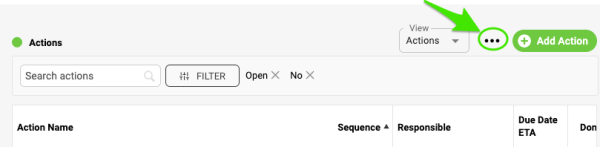
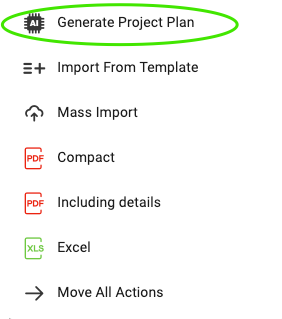
Open the three-dot menu. Click the ellipsis icon, then choose Generate Project Plan.
-
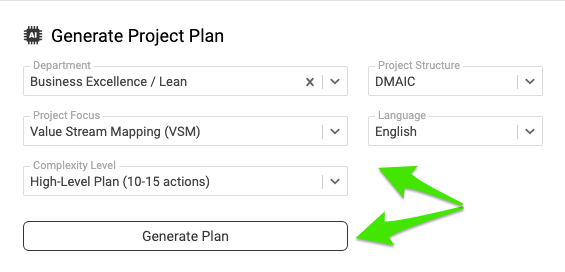
Choose your criteria. Select the criteria that match your department’s focus areas and click Generate Plan.
-
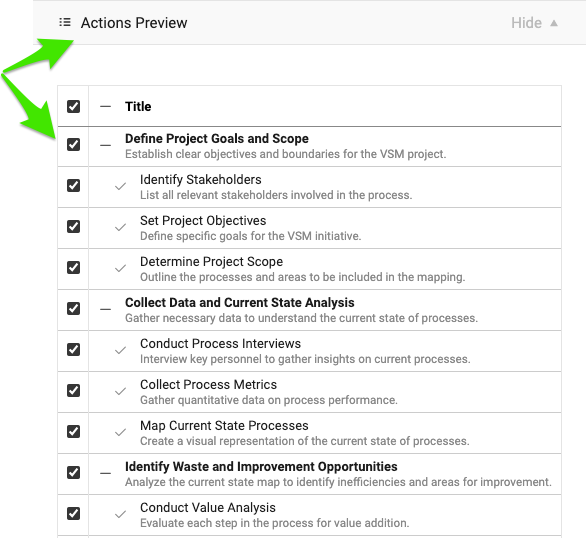
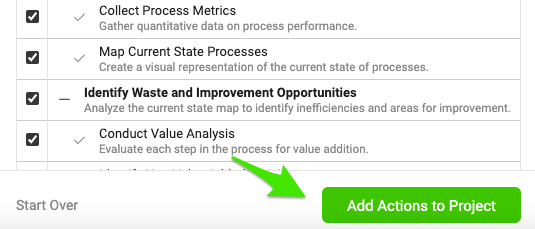
Review the suggested actions. A preview of the suggested actions appears. Review them to make sure they meet your needs.
-
Select or deselect actions. Select all suggested actions, or leave some out based on your preferences.
-
Add the actions to the project. Once you are happy with the selection, click Add Actions to Project.
Note: You can add or remove actions at any time as your project evolves. Now you’re all set to track your project’s progress.
AI分析已为每个部门梳理出项目的关键关注领域,帮助您清晰地起步。只需点击几下,即可生成结构清晰、经过实践检验的项目计划,满足您部门的需求和转型目标。
生成项目计划
-
进入项目。 打开要生成计划的项目。
-
打开三点菜单。 点击省略号图标,然后选择生成项目计划。
-
选择条件。 选择与部门关注领域相符的条件,然后点击生成计划。
-
查看建议的行动。 系统会显示建议行动的预览。请仔细查看,确保符合您的需求。
-
选择或取消选择行动。 选择全部建议的行动,或根据需要排除部分行动。
-
将行动添加到项目。 对所选内容满意后,点击将行动添加到项目。
注意:随着项目推进,您可以随时添加或删除行动。现在,您可以开始跟踪项目进展了。
还需要帮助吗?
请给我们留言。工作日我们通常会在一小时内回复。