批量导入项目和行动的文件模板
本文由英文机器翻译。 当前显示英文原文。
To upload a project (action list) or its actions from a CSV file, you first need to create a file template.
Create a file template
-
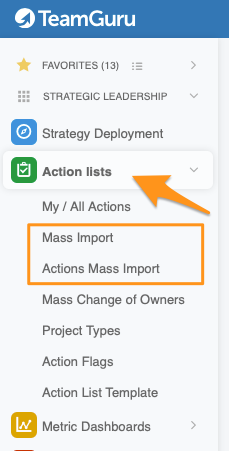
Open the mass import. In the Action Lists module, select from the submenu either Mass Import (to upload project headers and their entities) or Actions Mass Import (to upload project actions).
-
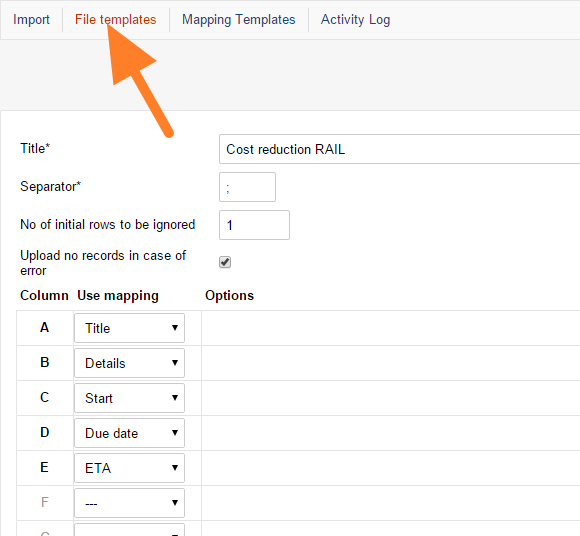
Add a file template. Go to File templates and click the add icon.

-
Name the template. Enter a template name (Title) and choose the separator used in your CSV files (usually a comma or semicolon).
-
Map the columns. Specify what information each column of your file contains.
-
Save the template. Click Save & Return.
-
Reuse the template. You can use the template for mass upload of actions as many times as you need.
要从CSV文件上传项目(行动清单)或其行动,需要先创建文件模板。
创建文件模板
-
打开批量导入。 在 行动清单 模块的子菜单中,选择 批量导入(上传项目标题及其实体)或 行动批量导入(上传项目行动)。
-
添加文件模板。 进入 文件模板,点击添加图标。
-
为模板命名。 输入模板名称(标题),并选择CSV文件使用的分隔符(通常为逗号或分号)。
-
映射列。 指定文件中每一列包含的信息。
-
保存模板。 点击 保存并返回。
-
重复使用模板。 该模板可以反复用于批量上传行动。
还需要帮助吗?
请给我们留言。工作日我们通常会在一小时内回复。